---
title: Benchmarking
description: How to benchmark Bun
---
Bun is designed for speed. Hot paths are extensively profiled and benchmarked. The source code for all of Bun's public benchmarks can be found in the [`/bench`](https://github.com/oven-sh/bun/tree/main/bench) directory of the Bun repo.
## Measuring time
To precisely measure time, Bun offers two runtime APIs functions:
1. The Web-standard [`performance.now()`](https://developer.mozilla.org/en-US/docs/Web/API/Performance/now) function
2. `Bun.nanoseconds()` which is similar to `performance.now()` except it returns the current time since the application started in nanoseconds. You can use `performance.timeOrigin` to convert this to a Unix timestamp.
## Benchmarking tools
When writing your own benchmarks, it's important to choose the right tool.
- For microbenchmarks, a great general-purpose tool is [`mitata`](https://github.com/evanwashere/mitata).
- For load testing, you _must use_ an HTTP benchmarking tool that is at least as fast as `Bun.serve()`, or your results will be skewed. Some popular Node.js-based benchmarking tools like [`autocannon`](https://github.com/mcollina/autocannon) are not fast enough. We recommend one of the following:
- [`bombardier`](https://github.com/codesenberg/bombardier)
- [`oha`](https://github.com/hatoo/oha)
- [`http_load_test`](https://github.com/uNetworking/uSockets/blob/master/examples/http_load_test.c)
- For benchmarking scripts or CLI commands, we recommend [`hyperfine`](https://github.com/sharkdp/hyperfine).
## Measuring memory usage
Bun has two heaps. One heap is for the JavaScript runtime and the other heap is for everything else.
### JavaScript heap stats
The `bun:jsc` module exposes a few functions for measuring memory usage:
```ts
import { heapStats } from "bun:jsc";
console.log(heapStats());
```
```ts expandable icon="/icons/typescript.svg"
{
heapSize: 1657575,
heapCapacity: 2872775,
extraMemorySize: 598199,
objectCount: 13790,
protectedObjectCount: 62,
globalObjectCount: 1,
protectedGlobalObjectCount: 1,
// A count of every object type in the heap
objectTypeCounts: {
CallbackObject: 25,
FunctionExecutable: 2078,
AsyncGeneratorFunction: 2,
'RegExp String Iterator': 1,
FunctionCodeBlock: 188,
ModuleProgramExecutable: 13,
String: 1,
UnlinkedModuleProgramCodeBlock: 13,
JSON: 1,
AsyncGenerator: 1,
Symbol: 1,
GetterSetter: 68,
ImportMeta: 10,
DOMAttributeGetterSetter: 1,
UnlinkedFunctionCodeBlock: 174,
RegExp: 52,
ModuleLoader: 1,
Intl: 1,
WeakMap: 4,
Generator: 2,
PropertyTable: 95,
'Array Iterator': 1,
JSLexicalEnvironment: 75,
UnlinkedFunctionExecutable: 2067,
WeakSet: 1,
console: 1,
Map: 23,
SparseArrayValueMap: 14,
StructureChain: 19,
Set: 18,
'String Iterator': 1,
FunctionRareData: 3,
JSGlobalLexicalEnvironment: 1,
Object: 481,
BigInt: 2,
StructureRareData: 55,
Array: 179,
AbortController: 2,
ModuleNamespaceObject: 11,
ShadowRealm: 1,
'Immutable Butterfly': 103,
Primordials: 1,
'Set Iterator': 1,
JSGlobalProxy: 1,
AsyncFromSyncIterator: 1,
ModuleRecord: 13,
FinalizationRegistry: 1,
AsyncIterator: 1,
InternalPromise: 22,
Iterator: 1,
CustomGetterSetter: 65,
Promise: 19,
WeakRef: 1,
InternalPromisePrototype: 1,
Function: 2381,
AsyncFunction: 2,
GlobalObject: 1,
ArrayBuffer: 2,
Boolean: 1,
Math: 1,
CallbackConstructor: 1,
Error: 2,
JSModuleEnvironment: 13,
WebAssembly: 1,
HashMapBucket: 300,
Callee: 3,
symbol: 37,
string: 2484,
Performance: 1,
ModuleProgramCodeBlock: 12,
JSSourceCode: 13,
JSPropertyNameEnumerator: 3,
NativeExecutable: 290,
Number: 1,
Structure: 1550,
SymbolTable: 108,
GeneratorFunction: 2,
'Map Iterator': 1
},
protectedObjectTypeCounts: {
CallbackConstructor: 1,
BigInt: 1,
RegExp: 2,
GlobalObject: 1,
UnlinkedModuleProgramCodeBlock: 13,
HashMapBucket: 2,
Structure: 41,
JSPropertyNameEnumerator: 1
}
}
```
JavaScript is a garbage-collected language, not reference counted. It's normal and correct for objects to not be freed immediately in all cases, though it's not normal for objects to never be freed.
To force garbage collection to run manually:
```ts
Bun.gc(true); // synchronous
Bun.gc(false); // asynchronous
```
Heap snapshots let you inspect what objects are not being freed. You can use the `bun:jsc` module to take a heap snapshot and then view it with Safari or WebKit GTK developer tools. To generate a heap snapshot:
```ts
import { generateHeapSnapshot } from "bun";
const snapshot = generateHeapSnapshot();
await Bun.write("heap.json", JSON.stringify(snapshot, null, 2));
```
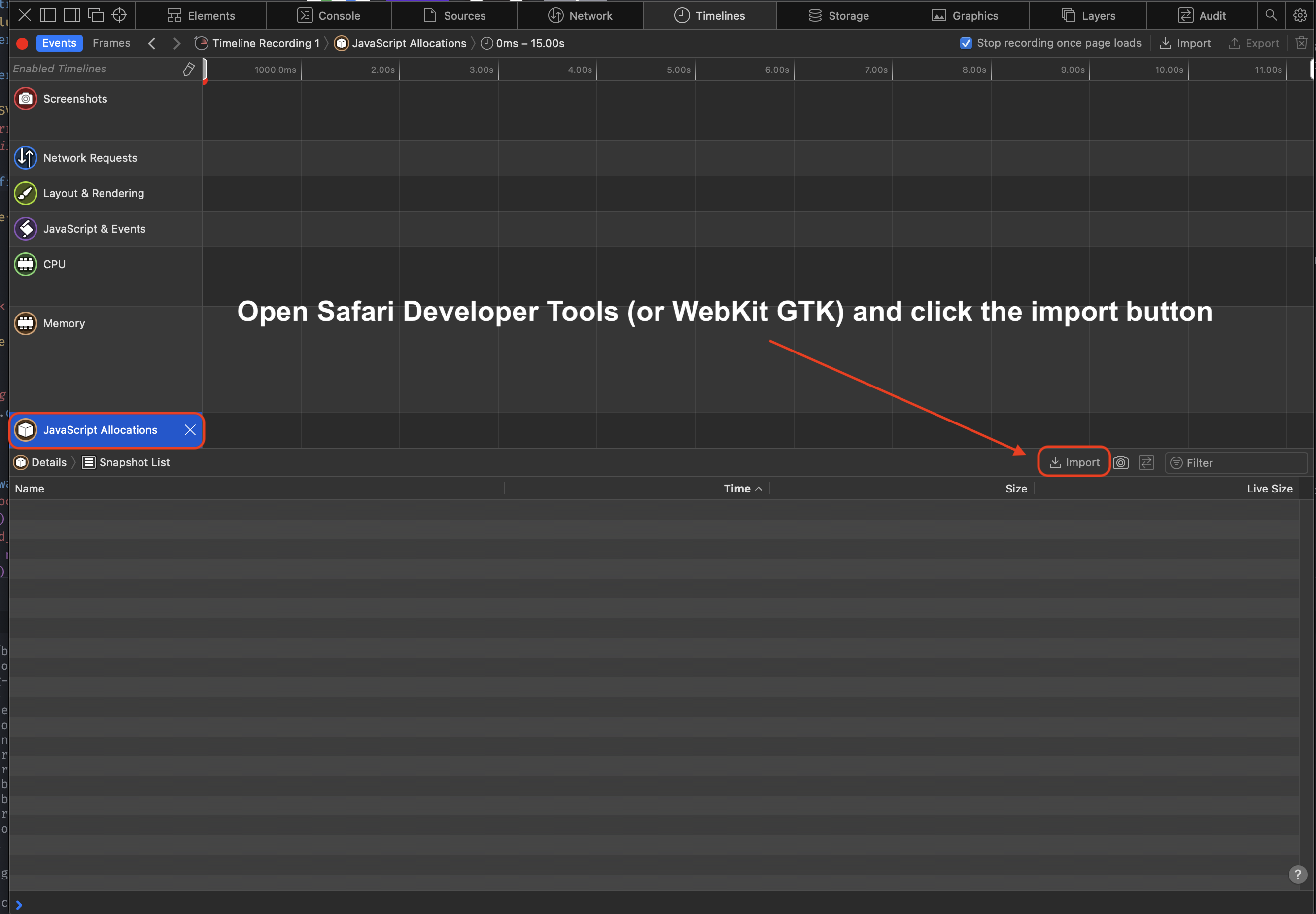
To view the snapshot, open the `heap.json` file in Safari's Developer Tools (or WebKit GTK)
1. Open the Developer Tools
2. Click "Timeline"
3. Click "JavaScript Allocations" in the menu on the left. It might not be visible until you click the pencil icon to show all the timelines
4. Click "Import" and select your heap snapshot JSON
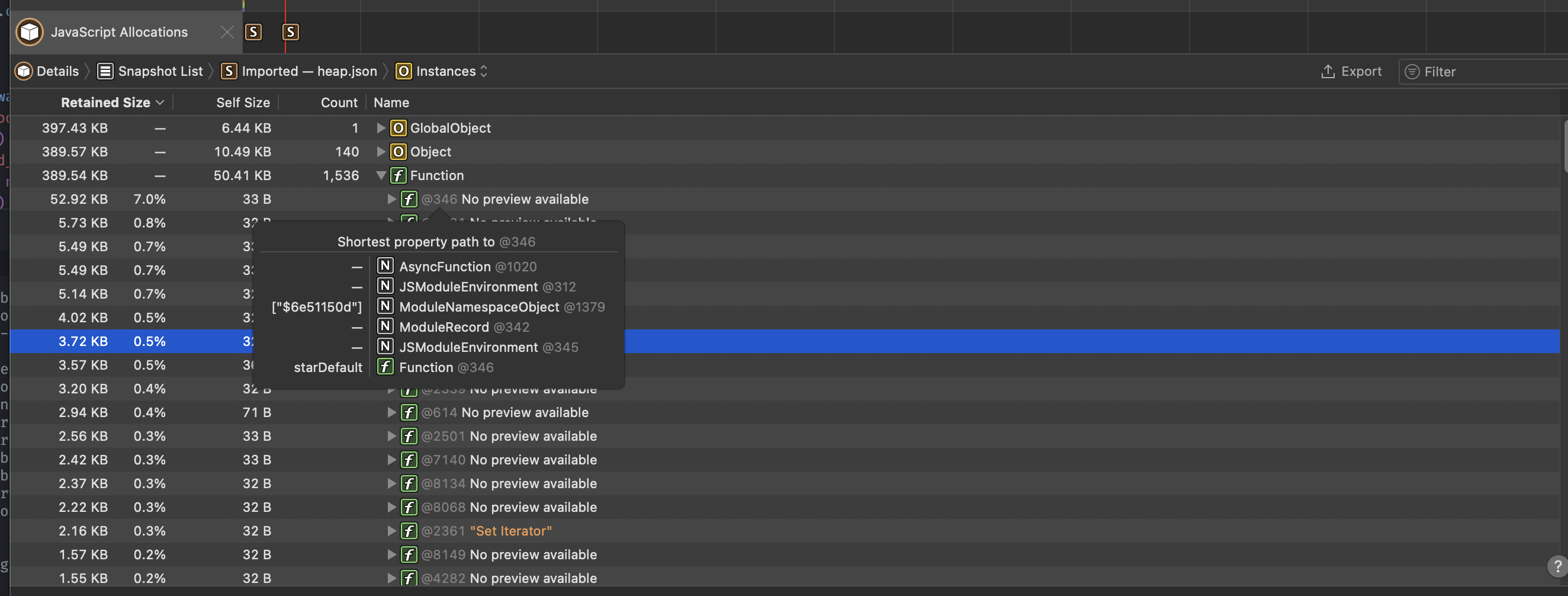
 Once imported, you should see something like this:
 > The [web debugger](/runtime/debugger#inspect) also offers the timeline feature which allows you to track and examine the memory usage of the running debug session.
### Native heap stats
Bun uses mimalloc for the other heap. To report a summary of non-JavaScript memory usage, set the `MIMALLOC_SHOW_STATS=1` environment variable. and stats will print on exit.
```sh terminal icon="terminal"
MIMALLOC_SHOW_STATS=1 bun script.js
```
```txt
heap stats: peak total freed current unit count
reserved: 64.0 MiB 64.0 MiB 0 64.0 MiB not all freed!
committed: 64.0 MiB 64.0 MiB 0 64.0 MiB not all freed!
reset: 0 0 0 0 ok
touched: 128.5 KiB 128.5 KiB 5.4 MiB -5.3 MiB ok
segments: 1 1 0 1 not all freed!
-abandoned: 0 0 0 0 ok
-cached: 0 0 0 0 ok
pages: 0 0 53 -53 ok
-abandoned: 0 0 0 0 ok
-extended: 0
-noretire: 0
mmaps: 0
commits: 0
threads: 0 0 0 0 ok
searches: 0.0 avg
numa nodes: 1
elapsed: 0.068 s
process: user: 0.061 s, system: 0.014 s, faults: 0, rss: 57.4 MiB, commit: 64.0 MiB
```
## CPU profiling
Profile JavaScript execution to identify performance bottlenecks with the `--cpu-prof` flag.
```sh terminal icon="terminal"
bun --cpu-prof script.js
```
This generates a `.cpuprofile` file you can open in Chrome DevTools (Performance tab → Load profile) or VS Code's CPU profiler.
### Markdown output
Use `--cpu-prof-md` to generate a markdown CPU profile, which is grep-friendly and designed for LLM analysis:
```sh terminal icon="terminal"
bun --cpu-prof-md script.js
```
Both `--cpu-prof` and `--cpu-prof-md` can be used together to generate both formats at once:
```sh terminal icon="terminal"
bun --cpu-prof --cpu-prof-md script.js
```
You can also trigger profiling via the `BUN_OPTIONS` environment variable:
```sh terminal icon="terminal"
BUN_OPTIONS="--cpu-prof-md" bun script.js
```
### Options
```sh terminal icon="terminal"
bun --cpu-prof --cpu-prof-name my-profile.cpuprofile script.js
bun --cpu-prof --cpu-prof-dir ./profiles script.js
```
| Flag | Description |
| ---------------------------- | ----------------------------------------------------------- |
| `--cpu-prof` | Generate a `.cpuprofile` JSON file (Chrome DevTools format) |
| `--cpu-prof-md` | Generate a markdown CPU profile (grep/LLM-friendly) |
| `--cpu-prof-name ` | Set output filename |
| `--cpu-prof-dir ` | Set output directory |
## Heap profiling
Generate heap snapshots on exit to analyze memory usage and find memory leaks.
```sh terminal icon="terminal"
bun --heap-prof script.js
```
This generates a V8 `.heapsnapshot` file that can be loaded in Chrome DevTools (Memory tab → Load).
### Markdown output
Use `--heap-prof-md` to generate a markdown heap profile for CLI analysis:
```sh terminal icon="terminal"
bun --heap-prof-md script.js
```
If both `--heap-prof` and `--heap-prof-md` are specified, the markdown format is used.
### Options
```sh terminal icon="terminal"
bun --heap-prof --heap-prof-name my-snapshot.heapsnapshot script.js
bun --heap-prof --heap-prof-dir ./profiles script.js
```
| Flag | Description |
| ----------------------------- | ------------------------------------------ |
| `--heap-prof` | Generate a V8 `.heapsnapshot` file on exit |
| `--heap-prof-md` | Generate a markdown heap profile on exit |
| `--heap-prof-name ` | Set output filename |
| `--heap-prof-dir ` | Set output directory |
> The [web debugger](/runtime/debugger#inspect) also offers the timeline feature which allows you to track and examine the memory usage of the running debug session.
### Native heap stats
Bun uses mimalloc for the other heap. To report a summary of non-JavaScript memory usage, set the `MIMALLOC_SHOW_STATS=1` environment variable. and stats will print on exit.
```sh terminal icon="terminal"
MIMALLOC_SHOW_STATS=1 bun script.js
```
```txt
heap stats: peak total freed current unit count
reserved: 64.0 MiB 64.0 MiB 0 64.0 MiB not all freed!
committed: 64.0 MiB 64.0 MiB 0 64.0 MiB not all freed!
reset: 0 0 0 0 ok
touched: 128.5 KiB 128.5 KiB 5.4 MiB -5.3 MiB ok
segments: 1 1 0 1 not all freed!
-abandoned: 0 0 0 0 ok
-cached: 0 0 0 0 ok
pages: 0 0 53 -53 ok
-abandoned: 0 0 0 0 ok
-extended: 0
-noretire: 0
mmaps: 0
commits: 0
threads: 0 0 0 0 ok
searches: 0.0 avg
numa nodes: 1
elapsed: 0.068 s
process: user: 0.061 s, system: 0.014 s, faults: 0, rss: 57.4 MiB, commit: 64.0 MiB
```
## CPU profiling
Profile JavaScript execution to identify performance bottlenecks with the `--cpu-prof` flag.
```sh terminal icon="terminal"
bun --cpu-prof script.js
```
This generates a `.cpuprofile` file you can open in Chrome DevTools (Performance tab → Load profile) or VS Code's CPU profiler.
### Markdown output
Use `--cpu-prof-md` to generate a markdown CPU profile, which is grep-friendly and designed for LLM analysis:
```sh terminal icon="terminal"
bun --cpu-prof-md script.js
```
Both `--cpu-prof` and `--cpu-prof-md` can be used together to generate both formats at once:
```sh terminal icon="terminal"
bun --cpu-prof --cpu-prof-md script.js
```
You can also trigger profiling via the `BUN_OPTIONS` environment variable:
```sh terminal icon="terminal"
BUN_OPTIONS="--cpu-prof-md" bun script.js
```
### Options
```sh terminal icon="terminal"
bun --cpu-prof --cpu-prof-name my-profile.cpuprofile script.js
bun --cpu-prof --cpu-prof-dir ./profiles script.js
```
| Flag | Description |
| ---------------------------- | ----------------------------------------------------------- |
| `--cpu-prof` | Generate a `.cpuprofile` JSON file (Chrome DevTools format) |
| `--cpu-prof-md` | Generate a markdown CPU profile (grep/LLM-friendly) |
| `--cpu-prof-name ` | Set output filename |
| `--cpu-prof-dir ` | Set output directory |
## Heap profiling
Generate heap snapshots on exit to analyze memory usage and find memory leaks.
```sh terminal icon="terminal"
bun --heap-prof script.js
```
This generates a V8 `.heapsnapshot` file that can be loaded in Chrome DevTools (Memory tab → Load).
### Markdown output
Use `--heap-prof-md` to generate a markdown heap profile for CLI analysis:
```sh terminal icon="terminal"
bun --heap-prof-md script.js
```
If both `--heap-prof` and `--heap-prof-md` are specified, the markdown format is used.
### Options
```sh terminal icon="terminal"
bun --heap-prof --heap-prof-name my-snapshot.heapsnapshot script.js
bun --heap-prof --heap-prof-dir ./profiles script.js
```
| Flag | Description |
| ----------------------------- | ------------------------------------------ |
| `--heap-prof` | Generate a V8 `.heapsnapshot` file on exit |
| `--heap-prof-md` | Generate a markdown heap profile on exit |
| `--heap-prof-name ` | Set output filename |
| `--heap-prof-dir ` | Set output directory |