 351e47355a
* [install] allow parallel execution of `postinstall` scripts

- fixes spurious exit code 42 from `spawn()`

* postinstall to a pipe

* feat(install): include top 500 packages as defaults for postinstall

* windows newline handling*

*i did not test it

* stuff

* cool

* a

* fix merge

* set `has_trusted_dependencies`

* fix a bunch of tests

* fix merge

* remove `PackageManager`

* remove commented code

* change to function

* Update lockfile.zig

* run scripts if added to `trustedDependencies` after install

* packages without `resolved` properties

* node-gyp scripts

* node-gyp script in the root

* another test

* git deps run prepare scripts

* fix merge

* run lifecycle scripts during installation

* Update lockfile.zig

* always increment

* 🏗️

* update tests

* tickWIthoutIdle

* const uws

* loop forwards through trees

* single buffer bitset list

* tag.isGit

* windows path separators

* `bun.sys.read` and enable/disable buffering

* fix test and waiter thread

* waiter thread and tests

* Update bun-install-registry.test.ts

* workspace exclude `preprepare` and `postprepare`

* Create esbuild.test.ts

* make sure length is the same

* remove deferred binlinks, add estrella test

* test with another version

* address some comments

* remove .verdaccio-db.json

* ooops

* fix build

* use `pid` to wait

* dont register pid_poll when using waiter thread

* stress test

* free

* fix failing tests

* fix linux crash, snapshot stress test

* oops

* concurrent scripts

* activate as soon as possible

* test

* delete stress test packages

* remove unused packages

* comment stress test and maybe fix segfault

* delete snapshot

* fix assertion

* use cpu_count * 2 for default concurrent scripts

* gear emoji

* add --concurrent-scripts to docs

* more docs

---------

Co-authored-by: alexlamsl <alexlamsl@gmail.com>
Co-authored-by: dave caruso <me@paperdave.net>
Co-authored-by: Dylan Conway <33744874+MilesWright7@users.noreply.github.com>
Co-authored-by: Jarred Sumner <jarred@jarredsumner.com>
6.0 KiB
The bun CLI contains a Node.js-compatible package manager designed to be a dramatically faster replacement for npm, yarn, and pnpm. It's a standalone tool that will work in pre-existing Node.js projects; if your project has a package.json, bun install can help you speed up your workflow.
{% callout %}
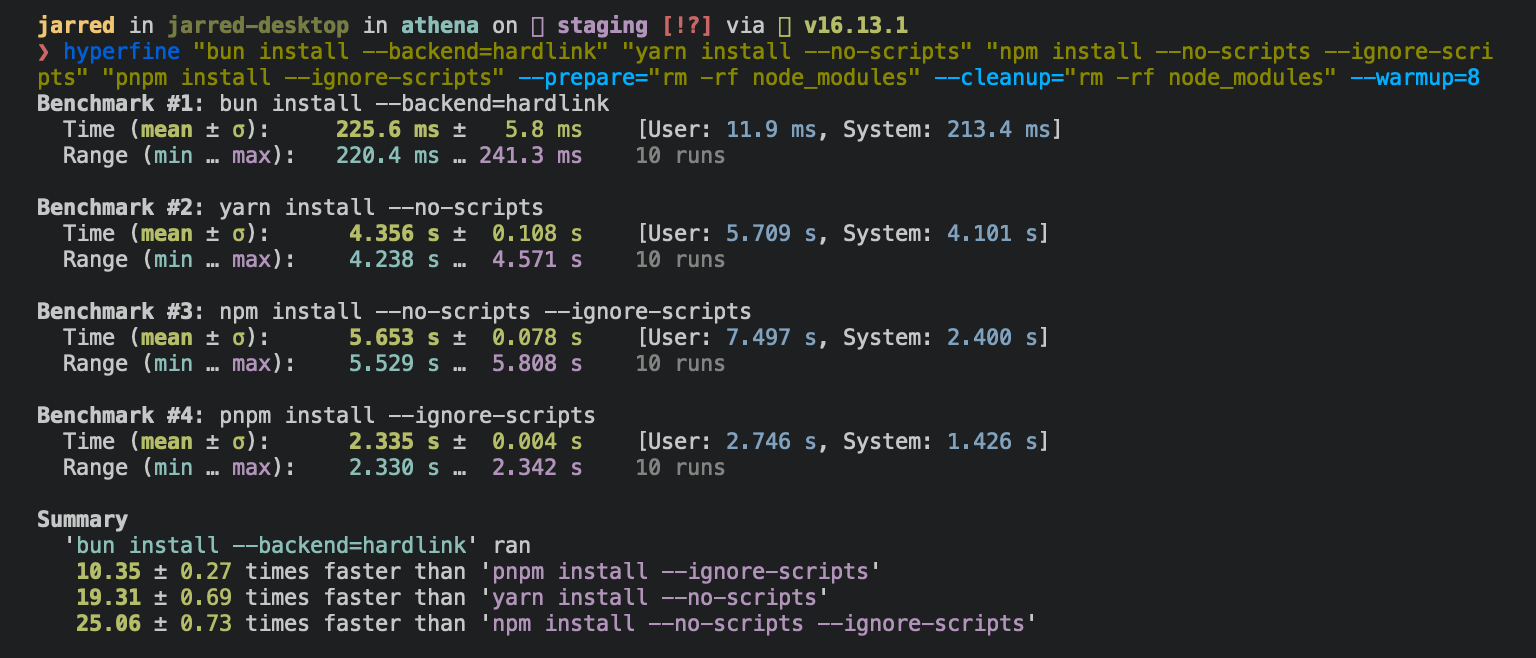
⚡️ 25x faster — Switch from npm install to bun install in any Node.js project to make your installations up to 25x faster.
{% image src="https://user-images.githubusercontent.com/709451/147004342-571b6123-17a9-49a2-8bfd-dcfc5204047e.png" height="200" /%}
{% /callout %}
{% details summary="For Linux users" %}
The recommended minimum Linux Kernel version is 5.6. If you're on Linux kernel 5.1 - 5.5, bun install will work, but HTTP requests will be slow due to a lack of support for io_uring's connect() operation.
If you're using Ubuntu 20.04, here's how to install a newer kernel:
# If this returns a version >= 5.6, you don't need to do anything
uname -r

# Install the official Ubuntu hardware enablement kernel
sudo apt install --install-recommends linux-generic-hwe-20.04
{% /details %}
To install all dependencies of a project:
$ bun install
Running bun install will:
- Install all
dependencies,devDependencies, andoptionalDependencies. Bun will installpeerDependenciesby default. - Run your project's
{pre|post}installand{pre|post}preparescripts at the appropriate time. For security reasons Bun does not execute lifecycle scripts of installed dependencies. - Write a
bun.lockblockfile to the project root.
Logging
To modify logging verbosity:
$ bun install --verbose # debug logging
$ bun install --silent  # no logging
Lifecycle scripts
Unlike other npm clients, Bun does not execute arbitrary lifecycle scripts like postinstall for installed dependencies. Executing arbitrary scripts represents a potential security risk.
To tell Bun to allow lifecycle scripts for a particular package, add the package to trustedDependencies in your package.json.
  {
    "name": "my-app",
    "version": "1.0.0",
+   "trustedDependencies": ["my-trusted-package"]
  }
Then re-install the package. Bun will read this field and run lifecycle scripts for my-trusted-package.
Lifecycle scripts will run in parallel during installation. To adjust the maximum number of concurrent scripts, use the --concurrent-scripts flag. The default is two times the reported cpu count or GOMAXPROCS.
$ bun install --concurrent-scripts 5
Workspaces
Bun supports "workspaces" in package.json. For complete documentation refer to Package manager > Workspaces.
{
  "name": "my-app",
  "version": "1.0.0",
  "workspaces": ["packages/*"],
  "dependencies": {
    "preact": "^10.5.13"
  }
}
Overrides and resolutions
Bun supports npm's "overrides" and Yarn's "resolutions" in package.json. These are mechanisms for specifying a version range for metadependencies—the dependencies of your dependencies. Refer to Package manager > Overrides and resolutions for complete documentation.
  {
    "name": "my-app",
    "dependencies": {
      "foo": "^2.0.0"
    },
+   "overrides": {
+     "bar": "~4.4.0"
+   }
  }
Global packages
To install a package globally, use the -g/--global flag. Typically this is used for installing command-line tools.
$ bun install --global cowsay # or `bun install -g cowsay`
$ cowsay "Bun!"
 ______
< Bun! >
 ------
        \   ^__^
         \  (oo)\_______
            (__)\       )\/\
                ||----w |
                ||     ||
Production mode
To install in production mode (i.e. without devDependencies or optionalDependencies):
$ bun install --production
For reproducible installs, use --frozen-lockfile. This will install the exact versions of each package specified in the lockfile. If your package.json disagrees with bun.lockb, Bun will exit with an error. The lockfile will not be updated.
$ bun install --frozen-lockfile
For more information on Bun's binary lockfile bun.lockb, refer to Package manager > Lockfile.
Dry run
To perform a dry run (i.e. don't actually install anything):
$ bun install --dry-run
Non-npm dependencies
Bun supports installing dependencies from Git, GitHub, and local or remotely-hosted tarballs. For complete documentation refer to Package manager > Git, GitHub, and tarball dependencies.
{
  "dependencies": {
    "dayjs": "git+https://github.com/iamkun/dayjs.git",
    "lodash": "git+ssh://github.com/lodash/lodash.git#4.17.21",
    "moment": "git@github.com:moment/moment.git",
    "zod": "github:colinhacks/zod",
    "react": "https://registry.npmjs.org/react/-/react-18.2.0.tgz"
  }
}
Configuration
The default behavior of bun install can be configured in bunfig.toml. The default values are shown below.
[install]

# whether to install optionalDependencies
optional = true

# whether to install devDependencies
dev = true

# whether to install peerDependencies
peer = true

# equivalent to `--production` flag
production = false

# equivalent to `--frozen-lockfile` flag
frozenLockfile = false

# equivalent to `--dry-run` flag
dryRun = false

# equivalent to `--concurrent-scripts` flag
concurrentScripts = 16 # (cpu count or GOMAXPROCS) x2
CI/CD
Looking to speed up your CI? Use the official oven-sh/setup-bun action to install bun in a GitHub Actions pipeline.
name: bun-types
jobs:
  build:
    name: build-app
    runs-on: ubuntu-latest
    steps:
      - name: Checkout repo
        uses: actions/checkout@v3
      - name: Install bun
        uses: oven-sh/setup-bun@v1
      - name: Install dependencies
        run: bun install
      - name: Build app
        run: bun run build