
34 KiB
The page primarily documents the Bun-native Bun.serve API. Bun also implements fetch and the Node.js http and https modules.
{% callout %} These modules have been re-implemented to use Bun's fast internal HTTP infrastructure. Feel free to use these modules directly; frameworks like Express that depend on these modules should work out of the box. For granular compatibility information, see Runtime > Node.js APIs. {% /callout %}
To start a high-performance HTTP server with a clean API, the recommended approach is Bun.serve.
Bun.serve()
Use Bun.serve to start an HTTP server in Bun.
Bun.serve({
  // `routes` requires Bun v1.2.3+
  routes: {
    // Static routes
    "/api/status": new Response("OK"),

    // Dynamic routes
    "/users/:id": req => {
      return new Response(`Hello User ${req.params.id}!`);
    },

    // Per-HTTP method handlers
    "/api/posts": {
      GET: () => new Response("List posts"),
      POST: async req => {
        const body = await req.json();
        return Response.json({ created: true, ...body });
      },
    },

    // Wildcard route for all routes that start with "/api/" and aren't otherwise matched
    "/api/*": Response.json({ message: "Not found" }, { status: 404 }),

    // Redirect from /blog/hello to /blog/hello/world
    "/blog/hello": Response.redirect("/blog/hello/world"),

    // Serve a file by buffering it in memory
    "/favicon.ico": new Response(await Bun.file("./favicon.ico").bytes(), {
      headers: {
        "Content-Type": "image/x-icon",
      },
    }),
  },

  // (optional) fallback for unmatched routes:
  // Required if Bun's version < 1.2.3
  fetch(req) {
    return new Response("Not Found", { status: 404 });
  },
});
Routing
Routes in Bun.serve() receive a BunRequest (which extends Request) and return a Response or Promise<Response>. This makes it easier to use the same code for both sending & receiving HTTP requests.
// Simplified for brevity
interface BunRequest<T extends string> extends Request {
  params: Record<T, string>;
  readonly cookies: CookieMap;
}
Async/await in routes
You can use async/await in route handlers to return a Promise<Response>.
import { sql, serve } from "bun";

serve({
  port: 3001,
  routes: {
    "/api/version": async () => {
      const [version] = await sql`SELECT version()`;
      return Response.json(version);
    },
  },
});
Promise in routes
You can also return a Promise<Response> from a route handler.
import { sql, serve } from "bun";

serve({
  routes: {
    "/api/version": () => {
      return new Promise(resolve => {
        setTimeout(async () => {
          const [version] = await sql`SELECT version()`;
          resolve(Response.json(version));
        }, 100);
      });
    },
  },
});
Type-safe route parameters
TypeScript parses route parameters when passed as a string literal, so that your editor will show autocomplete when accessing request.params.
import type { BunRequest } from "bun";

Bun.serve({
  routes: {
    // TypeScript knows the shape of params when passed as a string literal
    "/orgs/:orgId/repos/:repoId": req => {
      const { orgId, repoId } = req.params;
      return Response.json({ orgId, repoId });
    },

    "/orgs/:orgId/repos/:repoId/settings": (
      // optional: you can explicitly pass a type to BunRequest:
      req: BunRequest<"/orgs/:orgId/repos/:repoId/settings">,
    ) => {
      const { orgId, repoId } = req.params;
      return Response.json({ orgId, repoId });
    },
  },
});
Percent-encoded route parameter values are automatically decoded. Unicode characters are supported. Invalid unicode is replaced with the unicode replacement character &0xFFFD;.
Static responses
Routes can also be Response objects (without the handler function). Bun.serve() optimizes it for zero-allocation dispatch - perfect for health checks, redirects, and fixed content:
Bun.serve({
  routes: {
    // Health checks
    "/health": new Response("OK"),
    "/ready": new Response("Ready", {
      headers: {
        // Pass custom headers
        "X-Ready": "1",
      },
    }),

    // Redirects
    "/blog": Response.redirect("https://bun.com/blog"),

    // API responses
    "/api/config": Response.json({
      version: "1.0.0",
      env: "production",
    }),
  },
});
Static responses do not allocate additional memory after initialization. You can generally expect at least a 15% performance improvement over manually returning a Response object.
Static route responses are cached for the lifetime of the server object. To reload static routes, call server.reload(options).
const server = Bun.serve({
  static: {
    "/api/time": new Response(new Date().toISOString()),
  },

  fetch(req) {
    return new Response("404!");
  },
});

// Update the time every second.
setInterval(() => {
  server.reload({
    static: {
      "/api/time": new Response(new Date().toISOString()),
    },

    fetch(req) {
      return new Response("404!");
    },
  });
}, 1000);
Reloading routes only impact the next request. In-flight requests continue to use the old routes. After in-flight requests to old routes are finished, the old routes are freed from memory.
To simplify error handling, static routes do not support streaming response bodies from ReadableStream or an AsyncIterator. Fortunately, you can still buffer the response in memory first:
const time = await fetch("https://api.example.com/v1/data");
// Buffer the response in memory first.
const blob = await time.blob();

const server = Bun.serve({
  static: {
    "/api/data": new Response(blob),
  },

  fetch(req) {
    return new Response("404!");
  },
});
Route precedence
Routes are matched in order of specificity:
- Exact routes (
/users/all) - Parameter routes (
/users/:id) - Wildcard routes (
/users/*) - Global catch-all (
/*)
Bun.serve({
  routes: {
    // Most specific first
    "/api/users/me": () => new Response("Current user"),
    "/api/users/:id": req => new Response(`User ${req.params.id}`),
    "/api/*": () => new Response("API catch-all"),
    "/*": () => new Response("Global catch-all"),
  },
});
Per-HTTP Method Routes
Route handlers can be specialized by HTTP method:
Bun.serve({
  routes: {
    "/api/posts": {
      // Different handlers per method
      GET: () => new Response("List posts"),
      POST: async req => {
        const post = await req.json();
        return Response.json({ id: crypto.randomUUID(), ...post });
      },
      PUT: async req => {
        const updates = await req.json();
        return Response.json({ updated: true, ...updates });
      },
      DELETE: () => new Response(null, { status: 204 }),
    },
  },
});
You can pass any of the following methods:
| Method | Usecase example |
|---|---|
GET |
Fetch a resource |
HEAD |
Check if a resource exists |
OPTIONS |
Get allowed HTTP methods (CORS) |
DELETE |
Delete a resource |
PATCH |
Update a resource |
POST |
Create a resource |
PUT |
Update a resource |
When passing a function instead of an object, all methods will be handled by that function:
const server = Bun.serve({
  routes: {
    "/api/version": () => Response.json({ version: "1.0.0" }),
  },
});

await fetch(new URL("/api/version", server.url));
await fetch(new URL("/api/version", server.url), { method: "PUT" });
// ... etc
Hot Route Reloading
Update routes without server restarts using server.reload():
const server = Bun.serve({
  routes: {
    "/api/version": () => Response.json({ version: "1.0.0" }),
  },
});

// Deploy new routes without downtime
server.reload({
  routes: {
    "/api/version": () => Response.json({ version: "2.0.0" }),
  },
});
Error Handling
Bun provides structured error handling for routes:
Bun.serve({
  routes: {
    // Errors are caught automatically
    "/api/risky": () => {
      throw new Error("Something went wrong");
    },
  },
  // Global error handler
  error(error) {
    console.error(error);
    return new Response(`Internal Error: ${error.message}`, {
      status: 500,
      headers: {
        "Content-Type": "text/plain",
      },
    });
  },
});
HTML imports
Bun supports importing HTML files directly into your server code, enabling full-stack applications with both server-side and client-side code. HTML imports work in two modes:
Development (bun --hot): Assets are bundled on-demand at runtime, enabling hot module replacement (HMR) for a fast, iterative development experience. When you change your frontend code, the browser automatically updates without a full page reload.
Production (bun build): When building with bun build --target=bun, the import index from "./index.html" statement resolves to a pre-built manifest object containing all bundled client assets. Bun.serve consumes this manifest to serve optimized assets with zero runtime bundling overhead. This is ideal for deploying to production.
import myReactSinglePageApp from "./index.html";

Bun.serve({
  routes: {
    "/": myReactSinglePageApp,
  },
});
HTML imports don't just serve HTML — it's a full-featured frontend bundler, transpiler, and toolkit built using Bun's bundler, JavaScript transpiler and CSS parser. You can use this to build full-featured frontends with React, TypeScript, Tailwind CSS, and more.
For a complete guide on building full-stack applications with HTML imports, including detailed examples and best practices, see /docs/bundler/fullstack.
Practical example: REST API
Here's a basic database-backed REST API using Bun's router with zero dependencies:
{% codetabs %}
import type { Post } from "./types.ts";
import { Database } from "bun:sqlite";

const db = new Database("posts.db");
db.exec(`
  CREATE TABLE IF NOT EXISTS posts (
    id TEXT PRIMARY KEY,
    title TEXT NOT NULL,
    content TEXT NOT NULL,
    created_at TEXT NOT NULL
  )
`);

Bun.serve({
  routes: {
    // List posts
    "/api/posts": {
      GET: () => {
        const posts = db.query("SELECT * FROM posts").all();
        return Response.json(posts);
      },

      // Create post
      POST: async req => {
        const post: Omit<Post, "id" | "created_at"> = await req.json();
        const id = crypto.randomUUID();

        db.query(
          `INSERT INTO posts (id, title, content, created_at)
           VALUES (?, ?, ?, ?)`,
        ).run(id, post.title, post.content, new Date().toISOString());

        return Response.json({ id, ...post }, { status: 201 });
      },
    },

    // Get post by ID
    "/api/posts/:id": req => {
      const post = db
        .query("SELECT * FROM posts WHERE id = ?")
        .get(req.params.id);

      if (!post) {
        return new Response("Not Found", { status: 404 });
      }

      return Response.json(post);
    },
  },

  error(error) {
    console.error(error);
    return new Response("Internal Server Error", { status: 500 });
  },
});
export interface Post {
  id: string;
  title: string;
  content: string;
  created_at: string;
}
{% /codetabs %}
Routing performance
Bun.serve()'s router builds on top uWebSocket's tree-based approach to add SIMD-accelerated route parameter decoding and JavaScriptCore structure caching to push the performance limits of what modern hardware allows.
fetch request handler
The fetch handler handles incoming requests that weren't matched by any route. It receives a Request object and returns a Response or Promise<Response>.
Bun.serve({
  fetch(req) {
    const url = new URL(req.url);
    if (url.pathname === "/") return new Response("Home page!");
    if (url.pathname === "/blog") return new Response("Blog!");
    return new Response("404!");
  },
});
The fetch handler supports async/await:
import { sleep, serve } from "bun";
serve({
  async fetch(req) {
    const start = performance.now();
    await sleep(10);
    const end = performance.now();
    return new Response(`Slept for ${end - start}ms`);
  },
});
Promise-based responses are also supported:
Bun.serve({
  fetch(req) {
    // Forward the request to another server.
    return fetch("https://example.com");
  },
});
You can also access the Server object from the fetch handler. It's the second argument passed to the fetch function.
// `server` is passed in as the second argument to `fetch`.
const server = Bun.serve({
  fetch(req, server) {
    const ip = server.requestIP(req);
    return new Response(`Your IP is ${ip}`);
  },
});
Changing the port and hostname
To configure which port and hostname the server will listen on, set port and hostname in the options object.
Bun.serve({
  port: 8080, // defaults to $BUN_PORT, $PORT, $NODE_PORT otherwise 3000
  hostname: "mydomain.com", // defaults to "0.0.0.0"
  fetch(req) {
    return new Response("404!");
  },
});
To randomly select an available port, set port to 0.
const server = Bun.serve({
  port: 0, // random port
  fetch(req) {
    return new Response("404!");
  },
});

// server.port is the randomly selected port
console.log(server.port);
You can view the chosen port by accessing the port property on the server object, or by accessing the url property.
console.log(server.port); // 3000
console.log(server.url); // http://localhost:3000
Configuring a default port
Bun supports several options and environment variables to configure the default port. The default port is used when the port option is not set.
--portCLI flag
$ bun --port=4002 server.ts
BUN_PORTenvironment variable
$ BUN_PORT=4002 bun server.ts
PORTenvironment variable
$ PORT=4002 bun server.ts
NODE_PORTenvironment variable
$ NODE_PORT=4002 bun server.ts
Unix domain sockets
To listen on a unix domain socket, pass the unix option with the path to the socket.
Bun.serve({
  unix: "/tmp/my-socket.sock", // path to socket
  fetch(req) {
    return new Response(`404!`);
  },
});
Abstract namespace sockets
Bun supports Linux abstract namespace sockets. To use an abstract namespace socket, prefix the unix path with a null byte.
Bun.serve({
  unix: "\0my-abstract-socket", // abstract namespace socket
  fetch(req) {
    return new Response(`404!`);
  },
});
Unlike unix domain sockets, abstract namespace sockets are not bound to the filesystem and are automatically removed when the last reference to the socket is closed.
Error handling
To activate development mode, set development: true.
Bun.serve({
  development: true,
  fetch(req) {
    throw new Error("woops!");
  },
});
In development mode, Bun will surface errors in-browser with a built-in error page.
{% image src="/images/exception_page.png" caption="Bun's built-in 500 page" /%}
error callback
To handle server-side errors, implement an error handler. This function should return a Response to serve to the client when an error occurs. This response will supersede Bun's default error page in development mode.
Bun.serve({
  fetch(req) {
    throw new Error("woops!");
  },
  error(error) {
    return new Response(`<pre>${error}\n${error.stack}</pre>`, {
      headers: {
        "Content-Type": "text/html",
      },
    });
  },
});
{% callout %} Learn more about debugging in Bun {% /callout %}
The call to Bun.serve returns a Server object. To stop the server, call the .stop() method.
const server = Bun.serve({
  fetch() {
    return new Response("Bun!");
  },
});

server.stop();
TLS
Bun supports TLS out of the box, powered by BoringSSL. Enable TLS by passing in a value for key and cert; both are required to enable TLS.
  Bun.serve({
    fetch(req) {
      return new Response("Hello!!!");
    },

+   tls: {
+     key: Bun.file("./key.pem"),
+     cert: Bun.file("./cert.pem"),
+   }
  });
The key and cert fields expect the contents of your TLS key and certificate, not a path to it. This can be a string, BunFile, TypedArray, or Buffer.
Bun.serve({
  fetch() {},

  tls: {
    // BunFile
    key: Bun.file("./key.pem"),
    // Buffer
    key: fs.readFileSync("./key.pem"),
    // string
    key: fs.readFileSync("./key.pem", "utf8"),
    // array of above
    key: [Bun.file("./key1.pem"), Bun.file("./key2.pem")],
  },
});
If your private key is encrypted with a passphrase, provide a value for passphrase to decrypt it.
  Bun.serve({
    fetch(req) {
      return new Response("Hello!!!");
    },

    tls: {
      key: Bun.file("./key.pem"),
      cert: Bun.file("./cert.pem"),
+     passphrase: "my-secret-passphrase",
    }
  });
Optionally, you can override the trusted CA certificates by passing a value for ca. By default, the server will trust the list of well-known CAs curated by Mozilla. When ca is specified, the Mozilla list is overwritten.
  Bun.serve({
    fetch(req) {
      return new Response("Hello!!!");
    },
    tls: {
      key: Bun.file("./key.pem"), // path to TLS key
      cert: Bun.file("./cert.pem"), // path to TLS cert
+     ca: Bun.file("./ca.pem"), // path to root CA certificate
    }
  });
To override Diffie-Hellman parameters:
Bun.serve({
  // ...
  tls: {
    // other config
    dhParamsFile: "/path/to/dhparams.pem", // path to Diffie Hellman parameters
  },
});
Server name indication (SNI)
To configure the server name indication (SNI) for the server, set the serverName field in the tls object.
Bun.serve({
  // ...
  tls: {
    // ... other config
    serverName: "my-server.com", // SNI
  },
});
To allow multiple server names, pass an array of objects to tls, each with a serverName field.
Bun.serve({
  // ...
  tls: [
    {
      key: Bun.file("./key1.pem"),
      cert: Bun.file("./cert1.pem"),
      serverName: "my-server1.com",
    },
    {
      key: Bun.file("./key2.pem"),
      cert: Bun.file("./cert2.pem"),
      serverName: "my-server2.com",
    },
  ],
});
idleTimeout
To configure the idle timeout, set the idleTimeout field in Bun.serve.
Bun.serve({
  // 10 seconds:
  idleTimeout: 10,

  fetch(req) {
    return new Response("Bun!");
  },
});
This is the maximum amount of time a connection is allowed to be idle before the server closes it. A connection is idling if there is no data sent or received.
export default syntax
Thus far, the examples on this page have used the explicit Bun.serve API. Bun also supports an alternate syntax.
import {type Serve} from "bun";

export default {
  fetch(req) {
    return new Response("Bun!");
  },
} satisfies Serve;
Instead of passing the server options into Bun.serve, export default it. This file can be executed as-is; when Bun sees a file with a default export containing a fetch handler, it passes it into Bun.serve under the hood.
Streaming files
To stream a file, return a Response object with a BunFile object as the body.
Bun.serve({
  fetch(req) {
    return new Response(Bun.file("./hello.txt"));
  },
});
{% callout %}
⚡️ Speed — Bun automatically uses the sendfile(2) system call when possible, enabling zero-copy file transfers in the kernel—the fastest way to send files.
{% /callout %}
You can send part of a file using the slice(start, end) method on the Bun.file object. This automatically sets the Content-Range and Content-Length headers on the Response object.
Bun.serve({
  fetch(req) {
    // parse `Range` header
    const [start = 0, end = Infinity] = req.headers
      .get("Range") // Range: bytes=0-100
      .split("=") // ["Range: bytes", "0-100"]
      .at(-1) // "0-100"
      .split("-") // ["0", "100"]
      .map(Number); // [0, 100]

    // return a slice of the file
    const bigFile = Bun.file("./big-video.mp4");
    return new Response(bigFile.slice(start, end));
  },
});
Server Lifecycle Methods
server.stop() - Stop the server
To stop the server from accepting new connections:
const server = Bun.serve({
  fetch(req) {
    return new Response("Hello!");
  },
});

// Gracefully stop the server (waits for in-flight requests)
await server.stop();

// Force stop and close all active connections
await server.stop(true);
By default, stop() allows in-flight requests and WebSocket connections to complete. Pass true to immediately terminate all connections.
server.ref() and server.unref() - Process lifecycle control
Control whether the server keeps the Bun process alive:
// Don't keep process alive if server is the only thing running
server.unref();

// Restore default behavior - keep process alive
server.ref();
server.reload() - Hot reload handlers
Update the server's handlers without restarting:
const server = Bun.serve({
  routes: {
    "/api/version": Response.json({ version: "v1" }),
  },
  fetch(req) {
    return new Response("v1");
  },
});

// Update to new handler
server.reload({
  routes: {
    "/api/version": Response.json({ version: "v2" }),
  },
  fetch(req) {
    return new Response("v2");
  },
});
This is useful for development and hot reloading. Only fetch, error, and routes can be updated.
Per-Request Controls
server.timeout(Request, seconds) - Custom request timeouts
Set a custom idle timeout for individual requests:
const server = Bun.serve({
  fetch(req, server) {
    // Set 60 second timeout for this request
    server.timeout(req, 60);

    // If they take longer than 60 seconds to send the body, the request will be aborted
    await req.text();

    return new Response("Done!");
  },
});
Pass 0 to disable the timeout for a request.
server.requestIP(Request) - Get client information
Get client IP and port information:
const server = Bun.serve({
  fetch(req, server) {
    const address = server.requestIP(req);
    if (address) {
      return new Response(
        `Client IP: ${address.address}, Port: ${address.port}`,
      );
    }
    return new Response("Unknown client");
  },
});
Returns null for closed requests or Unix domain sockets.
Working with Cookies
Bun provides a built-in API for working with cookies in HTTP requests and responses. The BunRequest object includes a cookies property that provides a CookieMap for easily accessing and manipulating cookies. When using routes, Bun.serve() automatically tracks request.cookies.set and applies them to the response.
Reading cookies
Read cookies from incoming requests using the cookies property on the BunRequest object:
Bun.serve({
  routes: {
    "/profile": req => {
      // Access cookies from the request
      const userId = req.cookies.get("user_id");
      const theme = req.cookies.get("theme") || "light";

      return Response.json({
        userId,
        theme,
        message: "Profile page",
      });
    },
  },
});
Setting cookies
To set cookies, use the set method on the CookieMap from the BunRequest object.
Bun.serve({
  routes: {
    "/login": req => {
      const cookies = req.cookies;

      // Set a cookie with various options
      cookies.set("user_id", "12345", {
        maxAge: 60 * 60 * 24 * 7, // 1 week
        httpOnly: true,
        secure: true,
        path: "/",
      });

      // Add a theme preference cookie
      cookies.set("theme", "dark");

      // Modified cookies from the request are automatically applied to the response
      return new Response("Login successful");
    },
  },
});
Bun.serve() automatically tracks modified cookies from the request and applies them to the response.
Deleting cookies
To delete a cookie, use the delete method on the request.cookies (CookieMap) object:
Bun.serve({
  routes: {
    "/logout": req => {
      // Delete the user_id cookie
      req.cookies.delete("user_id", {
        path: "/",
      });

      return new Response("Logged out successfully");
    },
  },
});
Deleted cookies become a Set-Cookie header on the response with the maxAge set to 0 and an empty value.
Server Metrics
server.pendingRequests and server.pendingWebSockets
Monitor server activity with built-in counters:
const server = Bun.serve({
  fetch(req, server) {
    return new Response(
      `Active requests: ${server.pendingRequests}\n` +
        `Active WebSockets: ${server.pendingWebSockets}`,
    );
  },
});
server.subscriberCount(topic) - WebSocket subscribers
Get count of subscribers for a WebSocket topic:
const server = Bun.serve({
  fetch(req, server) {
    const chatUsers = server.subscriberCount("chat");
    return new Response(`${chatUsers} users in chat`);
  },
  websocket: {
    message(ws) {
      ws.subscribe("chat");
    },
  },
});
WebSocket Configuration
server.publish(topic, data, compress) - WebSocket Message Publishing
The server can publish messages to all WebSocket clients subscribed to a topic:
const server = Bun.serve({
  websocket: {
    message(ws) {
      // Publish to all "chat" subscribers
      server.publish("chat", "Hello everyone!");
    },
  },

  fetch(req) {
    // ...
  },
});
The publish() method returns:
- Number of bytes sent if successful
0if the message was dropped-1if backpressure was applied
WebSocket Handler Options
When configuring WebSockets, several advanced options are available through the websocket handler:
Bun.serve({
  websocket: {
    // Maximum message size (in bytes)
    maxPayloadLength: 64 * 1024,

    // Backpressure limit before messages are dropped
    backpressureLimit: 1024 * 1024,

    // Close connection if backpressure limit is hit
    closeOnBackpressureLimit: true,

    // Handler called when backpressure is relieved
    drain(ws) {
      console.log("Backpressure relieved");
    },

    // Enable per-message deflate compression
    perMessageDeflate: {
      compress: true,
      decompress: true,
    },

    // Send ping frames to keep connection alive
    sendPings: true,

    // Handlers for ping/pong frames
    ping(ws, data) {
      console.log("Received ping");
    },
    pong(ws, data) {
      console.log("Received pong");
    },

    // Whether server receives its own published messages
    publishToSelf: false,
  },
});
Benchmarks
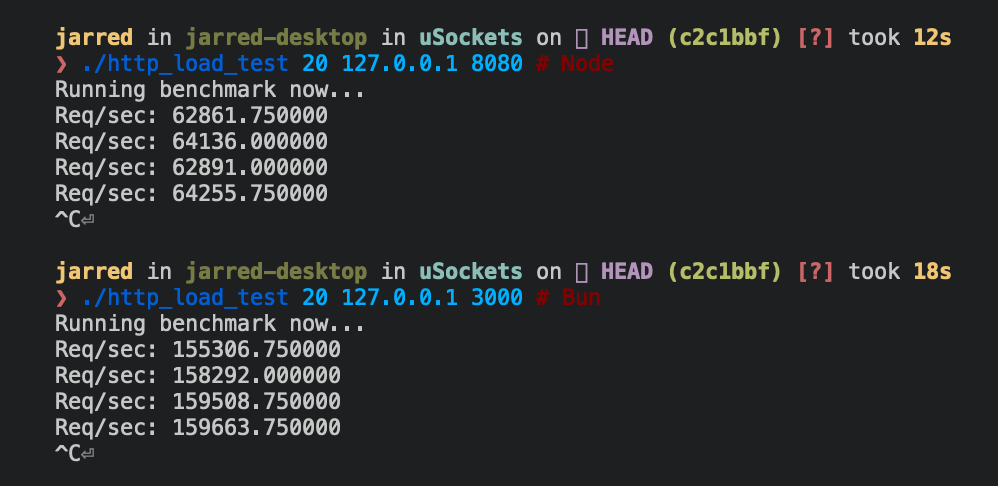
Below are Bun and Node.js implementations of a simple HTTP server that responds Bun! to each incoming Request.
{% codetabs %}
Bun.serve({
  fetch(req: Request) {
    return new Response("Bun!");
  },
  port: 3000,
});
require("http")
  .createServer((req, res) => res.end("Bun!"))
  .listen(8080);
{% /codetabs %}
The Bun.serve server can handle roughly 2.5x more requests per second than Node.js on Linux.
{% table %}
- Runtime
- Requests per second
- Node 16
- ~64,000
- Bun
- ~160,000
{% /table %}
{% image width="499" alt="image" src="https://user-images.githubusercontent.com/709451/162389032-fc302444-9d03-46be-ba87-c12bd8ce89a0.png" /%}
Reference
{% details summary="See TypeScript definitions" %}
interface Server extends Disposable {
  /**
   * Stop the server from accepting new connections.
   * @param closeActiveConnections If true, immediately terminates all connections
   * @returns Promise that resolves when the server has stopped
   */
  stop(closeActiveConnections?: boolean): Promise<void>;

  /**
   * Update handlers without restarting the server.
   * Only fetch and error handlers can be updated.
   */
  reload(options: Serve): void;

  /**
   * Make a request to the running server.
   * Useful for testing or internal routing.
   */
  fetch(request: Request | string): Response | Promise<Response>;

  /**
   * Upgrade an HTTP request to a WebSocket connection.
   * @returns true if upgrade successful, false if failed
   */
  upgrade<T = undefined>(
    request: Request,
    options?: {
      headers?: Bun.HeadersInit;
      data?: T;
    },
  ): boolean;

  /**
   * Publish a message to all WebSocket clients subscribed to a topic.
   * @returns Bytes sent, 0 if dropped, -1 if backpressure applied
   */
  publish(
    topic: string,
    data: string | ArrayBufferView | ArrayBuffer | SharedArrayBuffer,
    compress?: boolean,
  ): ServerWebSocketSendStatus;

  /**
   * Get count of WebSocket clients subscribed to a topic.
   */
  subscriberCount(topic: string): number;

  /**
   * Get client IP address and port.
   * @returns null for closed requests or Unix sockets
   */
  requestIP(request: Request): SocketAddress | null;

  /**
   * Set custom idle timeout for a request.
   * @param seconds Timeout in seconds, 0 to disable
   */
  timeout(request: Request, seconds: number): void;

  /**
   * Keep process alive while server is running.
   */
  ref(): void;

  /**
   * Allow process to exit if server is only thing running.
   */
  unref(): void;

  /** Number of in-flight HTTP requests */
  readonly pendingRequests: number;

  /** Number of active WebSocket connections */
  readonly pendingWebSockets: number;

  /** Server URL including protocol, hostname and port */
  readonly url: URL;

  /** Port server is listening on */
  readonly port: number;

  /** Hostname server is bound to */
  readonly hostname: string;

  /** Whether server is in development mode */
  readonly development: boolean;

  /** Server instance identifier */
  readonly id: string;
}

interface WebSocketHandler<T = undefined> {
  /** Maximum WebSocket message size in bytes */
  maxPayloadLength?: number;

  /** Bytes of queued messages before applying backpressure */
  backpressureLimit?: number;

  /** Whether to close connection when backpressure limit hit */
  closeOnBackpressureLimit?: boolean;

  /** Called when backpressure is relieved */
  drain?(ws: ServerWebSocket<T>): void | Promise<void>;

  /** Seconds before idle timeout */
  idleTimeout?: number;

  /** Enable per-message deflate compression */
  perMessageDeflate?:
    | boolean
    | {
        compress?: WebSocketCompressor | boolean;
        decompress?: WebSocketCompressor | boolean;
      };

  /** Send ping frames to keep connection alive */
  sendPings?: boolean;

  /** Whether server receives its own published messages */
  publishToSelf?: boolean;

  /** Called when connection opened */
  open?(ws: ServerWebSocket<T>): void | Promise<void>;

  /** Called when message received */
  message(
    ws: ServerWebSocket<T>,
    message: string | Buffer,
  ): void | Promise<void>;

  /** Called when connection closed */
  close?(
    ws: ServerWebSocket<T>,
    code: number,
    reason: string,
  ): void | Promise<void>;

  /** Called when ping frame received */
  ping?(ws: ServerWebSocket<T>, data: Buffer): void | Promise<void>;

  /** Called when pong frame received */
  pong?(ws: ServerWebSocket<T>, data: Buffer): void | Promise<void>;
}

interface TLSOptions {
  /** Certificate authority chain */
  ca?: string | Buffer | BunFile | Array<string | Buffer | BunFile>;

  /** Server certificate */
  cert?: string | Buffer | BunFile | Array<string | Buffer | BunFile>;

  /** Path to DH parameters file */
  dhParamsFile?: string;

  /** Private key */
  key?: string | Buffer | BunFile | Array<string | Buffer | BunFile>;

  /** Reduce TLS memory usage */
  lowMemoryMode?: boolean;

  /** Private key passphrase */
  passphrase?: string;

  /** OpenSSL options flags */
  secureOptions?: number;

  /** Server name for SNI */
  serverName?: string;
}
{% /details %}