
6.2 KiB
The bun CLI contains an npm-compatible package manager designed to be a faster replacement for existing package management tools like npm, yarn, and pnpm. It's designed for Node.js compatibility; use it in any Bun or Node.js project.
{% callout %}
⚡️ 80x faster — Switch from npm install to bun install in any Node.js project to make your installations up to 80x faster.
{% image src="https://user-images.githubusercontent.com/709451/147004342-571b6123-17a9-49a2-8bfd-dcfc5204047e.png" height="200" /%}
{% /callout %}
{% details summary="For Linux users" %}
The minimum Linux Kernel version is 5.1. If you're on Linux kernel 5.1 - 5.5, bun install should still work, but HTTP requests will be slow due to a lack of support for io_uring's connect() operation.
If you're using Ubuntu 20.04, here's how to install a newer kernel:
# If this returns a version >= 5.6, you don't need to do anything
uname -r

# Install the official Ubuntu hardware enablement kernel
sudo apt install --install-recommends linux-generic-hwe-20.04
{% /details %}
Manage dependencies
bun install
To install all dependencies of a project:
$ bun install
On Linux, bun install tends to install packages 20-100x faster than npm install. On macOS, it's more like 4-80x.
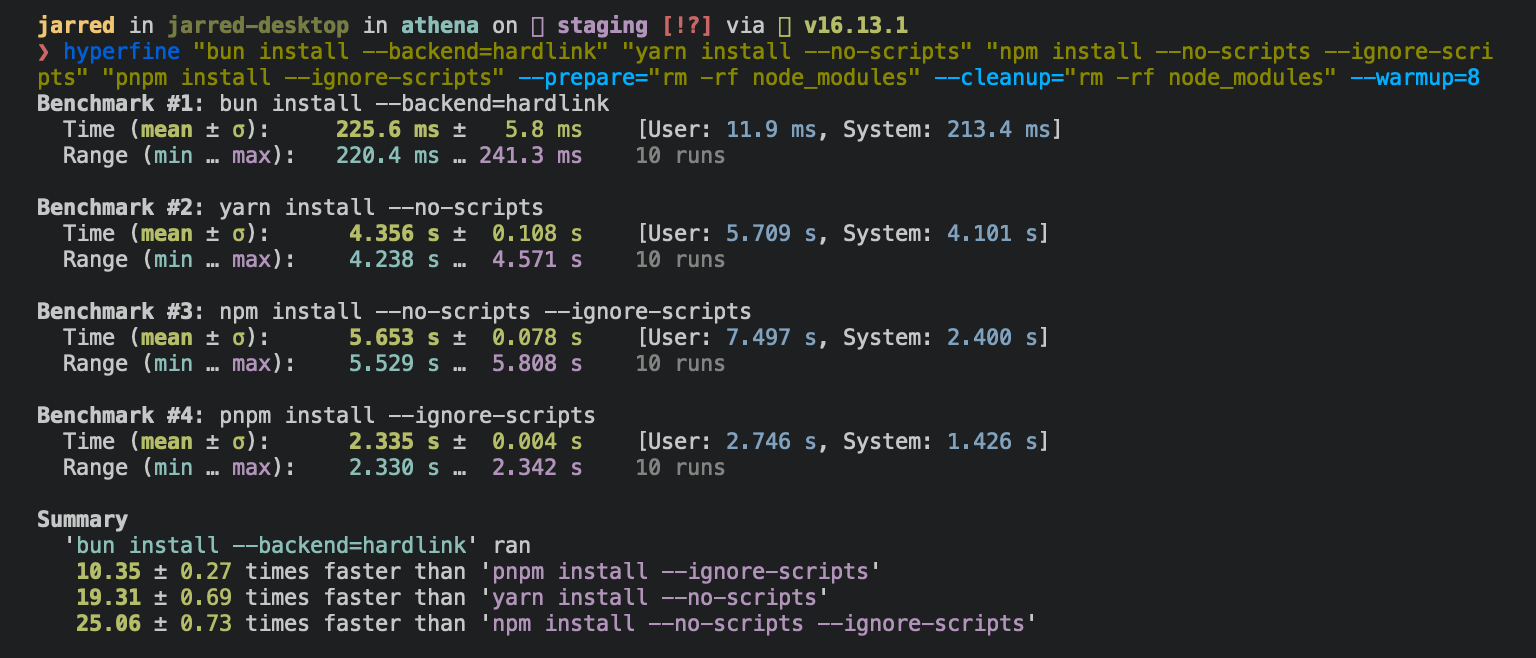
Running bun install will:
- Install all
dependencies,devDependencies, andoptionalDependencies. Bun will installpeerDependenciesby default. - Run your project's
{pre|post}installscripts at the appropriate time. For security reasons Bun does not execute lifecycle scripts of installed dependencies. - Write a
bun.locklockfile to the project root.
To install in production mode (i.e. without devDependencies):
$ bun install --production
To install dependencies without allowing changes to lockfile (useful on CI):
$ bun install --frozen-lockfile
To exclude dependency types from installing, use --omit with dev, optional, or peer:
# Disable devDependencies and optionalDependencies
$ bun install --omit=dev --omit=optional
To perform a dry run (i.e. don't actually install anything or update the lockfile):
$ bun install --dry-run
To generate a lockfile without install packages:
$ bun install --lockfile-only
To modify logging verbosity:
$ bun install --verbose # debug logging
$ bun install --silent  # no logging
To use isolated installs instead of the default hoisted strategy:
$ bun install --linker isolated
Isolated installs create strict dependency isolation similar to pnpm, preventing phantom dependencies and ensuring more deterministic builds. For complete documentation, see Isolated installs.
To protect against supply chain attacks, set a minimum age (in seconds) for package versions:
$ bun install --minimum-release-age 259200 # 3 days
{% details summary="Configuring behavior" %}
The default behavior of bun install can be configured in bunfig.toml:
[install]

# whether to install optionalDependencies
optional = true

# whether to install devDependencies
dev = true

# whether to install peerDependencies
peer = true

# equivalent to `--production` flag
production = false

# equivalent to `--save-text-lockfile` flag
saveTextLockfile = false

# equivalent to `--frozen-lockfile` flag
frozenLockfile = false

# equivalent to `--dry-run` flag
dryRun = false

# equivalent to `--concurrent-scripts` flag
concurrentScripts = 16 # (cpu count or GOMAXPROCS) x2

# installation strategy: "hoisted" or "isolated"
# default: "hoisted"
linker = "hoisted"

# minimum package age in seconds (protects against supply chain attacks)
minimumReleaseAge = 259200 # 3 days

# exclude packages from age requirement
minimumReleaseAgeExcludes = ["@types/node", "typescript"]
{% /details %}
bun add
To add a particular package:
$ bun add preact
To specify a version, version range, or tag:
$ bun add zod@3.20.0
$ bun add zod@^3.0.0
$ bun add zod@latest
To add a package as a dev dependency ("devDependencies"):
$ bun add --dev @types/react
$ bun add -d @types/react
To add a package as an optional dependency ("optionalDependencies"):
$ bun add --optional lodash
To add a package as a peer dependency ("peerDependencies"):
$ bun add --peer @types/bun
To install a package globally:
$ bun add --global cowsay # or `bun add -g cowsay`
$ cowsay "Bun!"
 ______
< Bun! >
 ------
        \   ^__^
         \  (oo)\_______
            (__)\       )\/\
                ||----w |
                ||     ||
{% details summary="Configuring global installation behavior" %}
[install]
# where `bun install --global` installs packages
globalDir = "~/.bun/install/global"

# where globally-installed package bins are linked
globalBinDir = "~/.bun/bin"
{% /details %} To view a complete list of options for a given command:
$ bun add --help
bun remove
To remove a dependency:
$ bun remove preact
Git dependencies
To add a dependency from a git repository:
$ bun install git@github.com:moment/moment.git
Bun supports a variety of protocols, including github, git, git+ssh, git+https, and many more.
{
  "dependencies": {
    "dayjs": "git+https://github.com/iamkun/dayjs.git",
    "lodash": "git+ssh://github.com/lodash/lodash.git#4.17.21",
    "moment": "git@github.com:moment/moment.git",
    "zod": "github:colinhacks/zod"
  }
}
Tarball dependencies
A package name can correspond to a publicly hosted .tgz file. During bun install, Bun will download and install the package from the specified tarball URL, rather than from the package registry.
{
  "dependencies": {
    "zod": "https://registry.npmjs.org/zod/-/zod-3.21.4.tgz"
  }
}