 e5421c56b1
* Support SQLite imports

* Docs

* Update executables.md

* Update loaders.md

* Update js_parser.zig

* Update loaders.md

* Update CMakeLists.txt

* Update Module.ts

* JSC got rid of `$trunc`?

---------

Co-authored-by: Jarred Sumner <709451+Jarred-Sumner@users.noreply.github.com>
14 KiB
Bun natively implements a high-performance SQLite3 driver. To use it import from the built-in bun:sqlite module.
import { Database } from "bun:sqlite";

const db = new Database(":memory:");
const query = db.query("select 'Hello world' as message;");
query.get(); // => { message: "Hello world" }
The API is simple, synchronous, and fast. Credit to better-sqlite3 and its contributors for inspiring the API of bun:sqlite.
Features include:
- Transactions
- Parameters (named & positional)
- Prepared statements
- Datatype conversions (
BLOBbecomesUint8Array) - The fastest performance of any SQLite driver for JavaScript
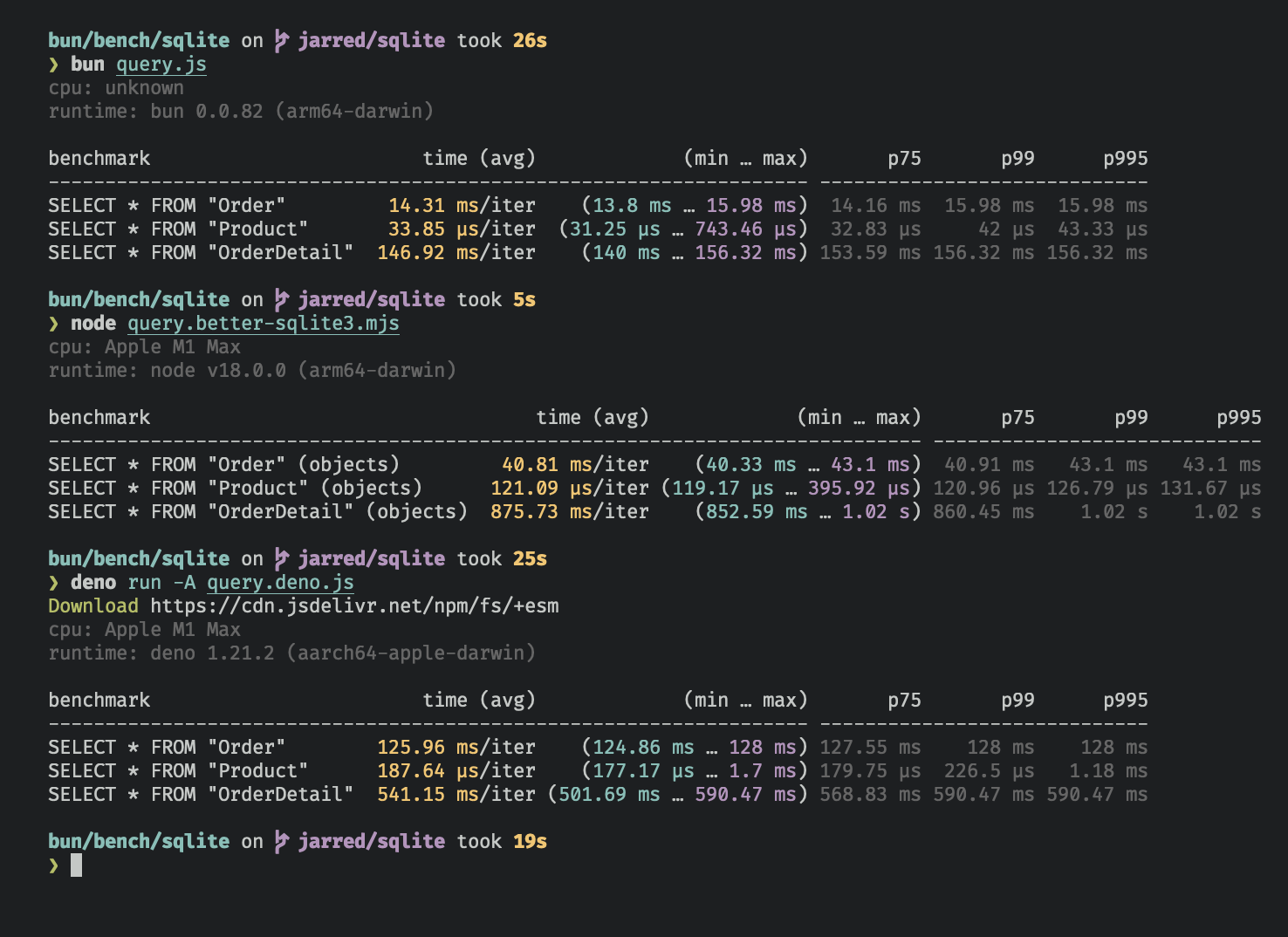
The bun:sqlite module is roughly 3-6x faster than better-sqlite3 and 8-9x faster than deno.land/x/sqlite for read queries. Each driver was benchmarked against the Northwind Traders dataset. View and run the benchmark source.
{% image width="738" alt="SQLite benchmarks for Bun, better-sqlite3, and deno.land/x/sqlite" src="https://user-images.githubusercontent.com/709451/168459263-8cd51ca3-a924-41e9-908d-cf3478a3b7f3.png" caption="Benchmarked on an M1 MacBook Pro (64GB) running macOS 12.3.1" /%}
Database
To open or create a SQLite3 database:
import { Database } from "bun:sqlite";

const db = new Database("mydb.sqlite");
To open an in-memory database:
import { Database } from "bun:sqlite";

// all of these do the same thing
const db = new Database(":memory:");
const db = new Database();
const db = new Database("");
To open in readonly mode:
import { Database } from "bun:sqlite";
const db = new Database("mydb.sqlite", { readonly: true });
To create the database if the file doesn't exist:
import { Database } from "bun:sqlite";
const db = new Database("mydb.sqlite", { create: true });
Load via ES module import
You can also use an import attribute to load a database.
import db from "./mydb.sqlite" with {"type": "sqlite"};

console.log(db.query("select * from users LIMIT 1").get());
This is equivalent to the following:
import { Database } from "bun:sqlite";
const db = new Database("./mydb.sqlite");
.close()
To close a database:
const db = new Database();
db.close();
Note: close() is called automatically when the database is garbage collected. It is safe to call multiple times but has no effect after the first.
.serialize()
bun:sqlite supports SQLite's built-in mechanism for serializing and deserializing databases to and from memory.
const olddb = new Database("mydb.sqlite");
const contents = olddb.serialize(); // => Uint8Array
const newdb = Database.deserialize(contents);
Internally, .serialize() calls sqlite3_serialize.
.query()
Use the db.query() method on your Database instance to prepare a SQL query. The result is a Statement instance that will be cached on the Database instance. The query will not be executed.
const query = db.query(`select "Hello world" as message`);
{% callout %}
Note — Use the .prepare() method to prepare a query without caching it on the Database instance.
// compile the prepared statement
const query = db.prepare("SELECT * FROM foo WHERE bar = ?");
{% /callout %}
WAL mode
SQLite supports write-ahead log mode (WAL) which dramatically improves performance, especially in situations with many concurrent writes. It's broadly recommended to enable WAL mode for most typical applications.
To enable WAL mode, run this pragma query at the beginning of your application:
db.exec("PRAGMA journal_mode = WAL;");
{% details summary="What is WAL mode" %} In WAL mode, writes to the database are written directly to a separate file called the "WAL file" (write-ahead log). This file will be later integrated into the main database file. Think of it as a buffer for pending writes. Refer to the SQLite docs for a more detailed overview. {% /details %}
Statements
A Statement is a prepared query, which means it's been parsed and compiled into an efficient binary form. It can be executed multiple times in a performant way.
Create a statement with the .query method on your Database instance.
const query = db.query(`select "Hello world" as message`);
Queries can contain parameters. These can be numerical (?1) or named ($param or :param or @param).
const query = db.query(`SELECT ?1, ?2;`);
const query = db.query(`SELECT $param1, $param2;`);
Values are bound to these parameters when the query is executed. A Statement can be executed with several different methods, each returning the results in a different form.
.all()
Use .all() to run a query and get back the results as an array of objects.
const query = db.query(`select $message;`);
query.all({ $message: "Hello world" });
// => [{ message: "Hello world" }]
Internally, this calls sqlite3_reset and repeatedly calls sqlite3_step until it returns SQLITE_DONE.
.get()
Use .get() to run a query and get back the first result as an object.
const query = db.query(`select $message;`);
query.get({ $message: "Hello world" });
// => { $message: "Hello world" }
Internally, this calls sqlite3_reset followed by sqlite3_step until it no longer returns SQLITE_ROW. If the query returns no rows, undefined is returned.
.run()
Use .run() to run a query and get back undefined. This is useful for queries schema-modifying queries (e.g. CREATE TABLE) or bulk write operations.
const query = db.query(`create table foo;`);
query.run();
// => undefined
Internally, this calls sqlite3_reset and calls sqlite3_step once. Stepping through all the rows is not necessary when you don't care about the results.
.values()
Use values() to run a query and get back all results as an array of arrays.
const query = db.query(`select $message;`);
query.values({ $message: "Hello world" });

query.values(2);
// [
//   [ "Iron Man", 2008 ],
//   [ "The Avengers", 2012 ],
//   [ "Ant-Man: Quantumania", 2023 ],
// ]
Internally, this calls sqlite3_reset and repeatedly calls sqlite3_step until it returns SQLITE_DONE.
.finalize()
Use .finalize() to destroy a Statement and free any resources associated with it. Once finalized, a Statement cannot be executed again. Typically, the garbage collector will do this for you, but explicit finalization may be useful in performance-sensitive applications.
const query = db.query("SELECT title, year FROM movies");
const movies = query.all();
query.finalize();
.toString()
Calling toString() on a Statement instance prints the expanded SQL query. This is useful for debugging.
import { Database } from "bun:sqlite";

// setup
const query = db.query("SELECT $param;");

console.log(query.toString()); // => "SELECT NULL"

query.run(42);
console.log(query.toString()); // => "SELECT 42"

query.run(365);
console.log(query.toString()); // => "SELECT 365"
Internally, this calls sqlite3_expanded_sql. The parameters are expanded using the most recently bound values.
Parameters
Queries can contain parameters. These can be numerical (?1) or named ($param or :param or @param). Bind values to these parameters when executing the query:
{% codetabs %}
const query = db.query("SELECT * FROM foo WHERE bar = $bar");
const results = query.all({
  $bar: "bar",
});
[
  { "$bar": "bar" }
]
{% /codetabs %}
Numbered (positional) parameters work too:
{% codetabs %}
const query = db.query("SELECT ?1, ?2");
const results = query.all("hello", "goodbye");
[
  {
    "?1": "hello",
    "?2": "goodbye"
  }
]
{% /codetabs %}
Transactions
Transactions are a mechanism for executing multiple queries in an atomic way; that is, either all of the queries succeed or none of them do. Create a transaction with the db.transaction() method:
const insertCat = db.prepare("INSERT INTO cats (name) VALUES ($name)");
const insertCats = db.transaction(cats => {
  for (const cat of cats) insertCat.run(cat);
});
At this stage, we haven't inserted any cats! The call to db.transaction() returns a new function (insertCats) that wraps the function that executes the queries.
To execute the transaction, call this function. All arguments will be passed through to the wrapped function; the return value of the wrapped function will be returned by the transaction function. The wrapped function also has access to the this context as defined where the transaction is executed.
const insert = db.prepare("INSERT INTO cats (name) VALUES ($name)");
const insertCats = db.transaction(cats => {
  for (const cat of cats) insert.run(cat);
  return cats.length;
});

const count = insertCats([
  { $name: "Keanu" },
  { $name: "Salem" },
  { $name: "Crookshanks" },
]);

console.log(`Inserted ${count} cats`);
The driver will automatically begin a transaction when insertCats is called and commit it when the wrapped function returns. If an exception is thrown, the transaction will be rolled back. The exception will propagate as usual; it is not caught.
{% callout %} Nested transactions — Transaction functions can be called from inside other transaction functions. When doing so, the inner transaction becomes a savepoint.
{% details summary="View nested transaction example" %}
// setup
import { Database } from "bun:sqlite";
const db = Database.open(":memory:");
db.run(
  "CREATE TABLE expenses (id INTEGER PRIMARY KEY AUTOINCREMENT, note TEXT, dollars INTEGER);",
);
db.run(
  "CREATE TABLE cats (id INTEGER PRIMARY KEY AUTOINCREMENT, name TEXT UNIQUE, age INTEGER)",
);
const insertExpense = db.prepare(
  "INSERT INTO expenses (note, dollars) VALUES (?, ?)",
);
const insert = db.prepare("INSERT INTO cats (name, age) VALUES ($name, $age)");
const insertCats = db.transaction(cats => {
  for (const cat of cats) insert.run(cat);
});

const adopt = db.transaction(cats => {
  insertExpense.run("adoption fees", 20);
  insertCats(cats); // nested transaction
});

adopt([
  { $name: "Joey", $age: 2 },
  { $name: "Sally", $age: 4 },
  { $name: "Junior", $age: 1 },
]);
{% /details %} {% /callout %}
Transactions also come with deferred, immediate, and exclusive versions.
insertCats(cats); // uses "BEGIN"
insertCats.deferred(cats); // uses "BEGIN DEFERRED"
insertCats.immediate(cats); // uses "BEGIN IMMEDIATE"
insertCats.exclusive(cats); // uses "BEGIN EXCLUSIVE"
.loadExtension()
To load a SQLite extension, call .loadExtension(name) on your Database instance
import { Database } from "bun:sqlite";

const db = new Database();
db.loadExtension("myext");
{% details summary="For macOS users" %} MacOS users By default, macOS ships with Apple's proprietary build of SQLite, which doesn't support extensions. To use extensions, you'll need to install a vanilla build of SQLite.
$ brew install sqlite
$ which sqlite # get path to binary
To point bun:sqlite to the new build, call Database.setCustomSQLite(path) before creating any Database instances. (On other operating systems, this is a no-op.) Pass a path to the SQLite .dylib file, not the executable. With recent versions of Homebrew this is something like /opt/homebrew/Cellar/sqlite/<version>/libsqlite3.dylib.
import { Database } from "bun:sqlite";

Database.setCustomSQLite("/path/to/libsqlite.dylib");

const db = new Database();
db.loadExtension("myext");
{% /details %}
Reference
class Database {
  constructor(
    filename: string,
    options?:
      | number
      | {
          readonly?: boolean;
          create?: boolean;
          readwrite?: boolean;
        },
  );

  query<Params, ReturnType>(sql: string): Statement<Params, ReturnType>;
}

class Statement<Params, ReturnType> {
  all(params: Params): ReturnType[];
  get(params: Params): ReturnType | undefined;
  run(params: Params): void;
  values(params: Params): unknown[][];

  finalize(): void; // destroy statement and clean up resources
  toString(): string; // serialize to SQL

  columnNames: string[]; // the column names of the result set
  paramsCount: number; // the number of parameters expected by the statement
  native: any; // the native object representing the statement
}

type SQLQueryBindings =
  | string
  | bigint
  | TypedArray
  | number
  | boolean
  | null
  | Record<string, string | bigint | TypedArray | number | boolean | null>;
Datatypes
| JavaScript type | SQLite type |
|---|---|
string |
TEXT |
number |
INTEGER or DECIMAL |
boolean |
INTEGER (1 or 0) |
Uint8Array |
BLOB |
Buffer |
BLOB |
bigint |
INTEGER |
null |
NULL |