
4.8 KiB
The bun CLI contains an npm-compatible package manager designed to be a faster replacement for existing package management tools like npm, yarn, and pnpm. It's designed for Node.js compatibility; use it in any Bun or Node.js project.
{% callout %}
⚡️ 80x faster — Switch from npm install to bun install in any Node.js project to make your installations up to 80x faster.
{% image src="https://user-images.githubusercontent.com/709451/147004342-571b6123-17a9-49a2-8bfd-dcfc5204047e.png" height="200" /%}
{% /callout %}
{% details summary="For Linux users" %}
The minimum Linux Kernel version is 5.1. If you're on Linux kernel 5.1 - 5.5, bun install should still work, but HTTP requests will be slow due to a lack of support for io_uring's connect() operation.
If you're using Ubuntu 20.04, here's how to install a newer kernel:
# If this returns a version >= 5.6, you don't need to do anything
uname -r

# Install the official Ubuntu hardware enablement kernel
sudo apt install --install-recommends linux-generic-hwe-20.04
{% /details %}
Manage dependencies
bun install
To install all dependencies of a project:
$ bun install
On Linux, bun install tends to install packages 20-100x faster than npm install. On macOS, it's more like 4-80x.
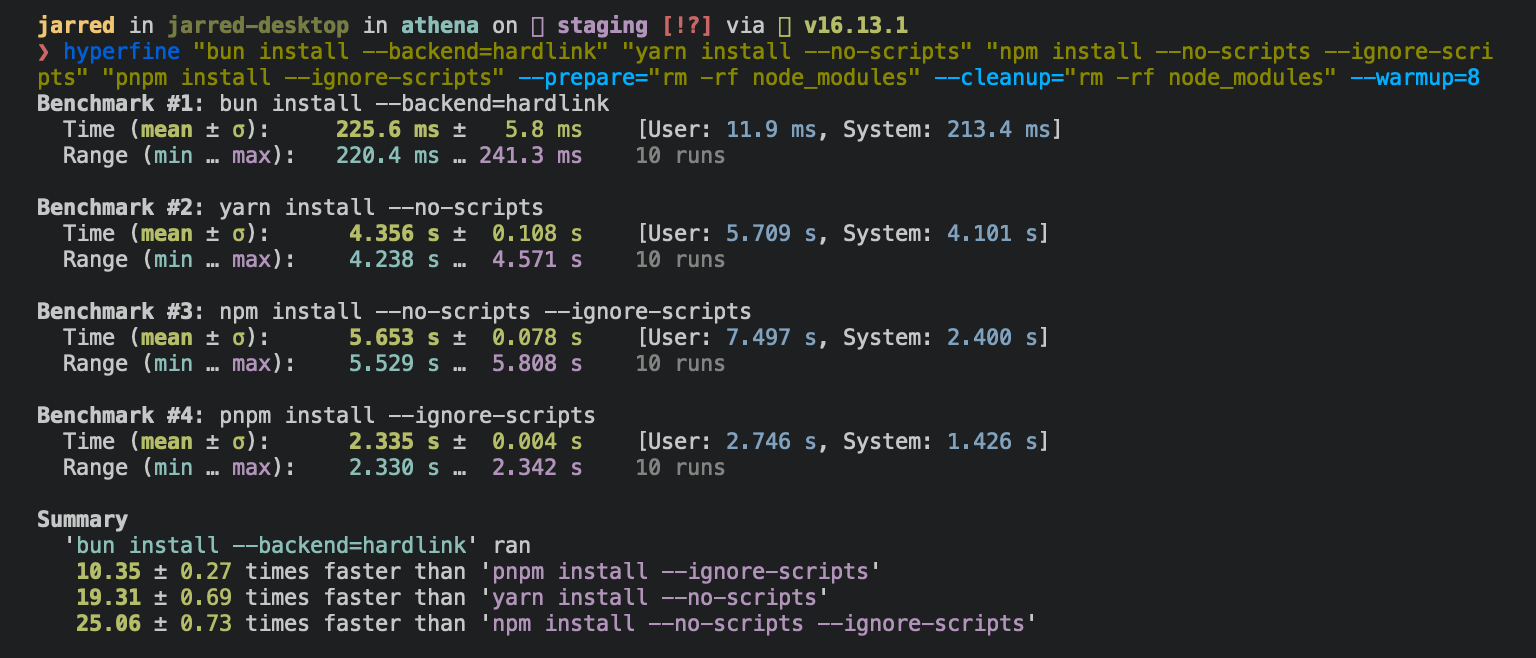
Running bun install will:
- Install all
dependencies,devDependencies, andoptionalDependencies. Bun does not installpeerDependenciesby default. - Run your project's
{pre|post}installscripts at the appropriate time. For security reasons Bun does not execute lifecycle scripts of installed dependencies. - Write a
bun.lockblockfile to the project root.
To install in production mode (i.e. without devDependencies):
$ bun install --production
To install dependencies without allowing changes to lockfile (useful on CI):
$ bun install --frozen-lockfile
To perform a dry run (i.e. don't actually install anything):
$ bun install --dry-run
To modify logging verbosity:
$ bun install --verbose # debug logging
$ bun install --silent  # no logging
{% details summary="Configuring behavior" %}
The default behavior of bun install can be configured in bunfig.toml:
[install]

# whether to install optionalDependencies
optional = true

# whether to install devDependencies
dev = true

# whether to install peerDependencies
peer = false

# equivalent to `--production` flag
production = false

# equivalent to `--frozen-lockfile` flag
frozenLockfile = false

# equivalent to `--dry-run` flag
dryRun = false
{% /details %}
bun add
To add a particular package:
$ bun add preact
To specify a version, version range, or tag:
$ bun add zod@3.20.0
$ bun add zod@^3.0.0
$ bun add zod@latest
To add a package as a dev dependency ("devDependencies"):
$ bun add --dev @types/react
$ bun add -d @types/react
To add a package as an optional dependency ("optionalDependencies"):
$ bun add --optional lodash
To install a package globally:
$ bun add --global cowsay # or `bun add -g cowsay`
$ cowsay "Bun!"
 ______
< Bun! >
 ------
        \   ^__^
         \  (oo)\_______
            (__)\       )\/\
                ||----w |
                ||     ||
{% details summary="Configuring global installation behavior" %}
[install]
# where `bun install --global` installs packages
globalDir = "~/.bun/install/global"

# where globally-installed package bins are linked
globalBinDir = "~/.bun/bin"
{% /details %} To view a complete list of options for a given command:
$ bun add --help
bun remove
To remove a dependency:
$ bun remove preact
Git dependencies
To add a dependency from a git repository:
$ bun install git@github.com:moment/moment.git
Bun supports a variety of protocols, including github, git, git+ssh, git+https, and many more.
{
  "dependencies": {
    "dayjs": "git+https://github.com/iamkun/dayjs.git",
    "lodash": "git+ssh://github.com/lodash/lodash.git#4.17.21",
    "moment": "git@github.com:moment/moment.git",
    "zod": "github:colinhacks/zod"
  }
}
Tarball dependencies
A package name can correspond to a publicly hosted .tgz file. During bun install, Bun will download and install the package from the specified tarball URL, rather than from the package registry.
{
  "dependencies": {
    "zod": "https://registry.npmjs.org/zod/-/zod-3.21.4.tgz"
  }
}