
6.5 KiB
{% callout %}
Note — Bun provides an almost complete implementation of the Node.js http and https modules. This page only documents Bun-native APIs.
{% /callout %}
Start a server
Bun.serve(options) => Server
Start an HTTP server in Bun with Bun.serve.
Bun.serve({
  fetch(req) {
    return new Response(`Bun!`);
  },
});
The fetch handler handles incoming requests. It receives a Request object and returns a Response or Promise<Response>.
Bun.serve({
  fetch(req) {
    const url = new URL(req.url);
    if (url.pathname === "/") return new Response(`Home page!`);
    if (url.pathname === "/blog") return new Response("Blog!");
    return new Response(`404!`);
  },
});
To configure which port and hostname the server will listen on:
Bun.serve({
  port: 8080, // defaults to $PORT, then 3000
  hostname: "mydomain.com", // defaults to "0.0.0.0"
  fetch(req) {
    return new Response(`404!`);
  },
});
Error handling
To activate development mode, set development: true. By default, development mode is enabled unless NODE_ENV is production.
Bun.serve({
  development: true,
  fetch(req) {
    throw new Error("woops!");
  },
});
In development mode, Bun will surface errors in-browser with a built-in error page.
{% image src="/images/exception_page.png" caption="Bun's built-in 500 page" /%}
To handle server-side errors, implement an error handler. This function should return a Response to served to the client when an error occurs. This response will supercede Bun's default error page in development mode.
Bun.serve({
  fetch(req) {
    throw new Error("woops!");
  },
  error(error: Error) {
    return new Response(`<pre>${error}\n${error.stack}</pre>`, {
      headers: {
        "Content-Type": "text/html",
      },
    });
  },
});
{% callout %} Note — Full debugger support is planned. {% /callout %}
The call to Bun.serve returns a Server object. To stop the server, call the .stop() method.
const server = Bun.serve({
  fetch() {
    return new Response("Bun!");
  },
});

server.stop();
TLS
Bun supports TLS out of the box, powered by OpenSSL. Enable TLS by passing in a value for keyFile and certFile; both are required to enable TLS. If needed, supply a passphrase to decrypt the keyFile.
Bun.serve({
  fetch(req) {
    return new Response("Hello!!!");
  },
  keyFile: "./key.pem", // path to TLS key
  certFile: "./cert.pem", // path to TLS cert
  passphrase: "super-secret", // optional passphrase
});
The root CA and Diffie-Helman parameters can be configured as well.
Bun.serve({
  fetch(req) {
    return new Response("Hello!!!");
  },
  keyFile: "./key.pem", // path to TLS key
  certFile: "./cert.pem", // path to TLS cert
  caFile: "./ca.pem", // path to root CA certificate
  dhParamsFile: "./dhparams.pem", // Diffie Helman parameters
});
Hot reloading
Thus far, the examples on this page have used the explicit Bun.serve API. Bun also supports an alternate syntax.
export default {
  fetch(req) {
    return new Response(`Bun!`);
  },
};
Instead of passing the server options into Bun.serve, export it. This file can be executed as-is; when Bun runs a file with a default export containing a fetch handler, it passes it into Bun.serve under the hood.
This syntax has one major advantage: it is hot-reloadable out of the box. When any source file is changed, Bun will reload the server with the updated code without restarting the process. This makes hot reloads nearly instantaneous. Use the --hot flag when starting the server to enable hot reloading.
$ bun --hot server.ts
It's possible to configure hot reloading while using the explicit Bun.serve API; for details refer to Runtime > Hot reloading.
Streaming files
To stream a file, return a Response object with a BunFile object as the body.
import { serve, file } from "bun";

serve({
  fetch(req) {
    return new Response(Bun.file("./hello.txt"));
  },
});
{% callout %}
⚡️ Speed — Bun automatically uses the sendfile(2) system call when possible, enabling zero-copy file transfers in the kernel—the fastest way to send files.
{% /callout %}
[v0.3.0+] You can send part of a file using the slice(start, end) method on the Bun.file object. This automatically sets the Content-Range and Content-Length headers on the Response object.
Bun.serve({
  fetch(req) {
    // parse `Range` header
    const [start = 0, end = Infinity] = req.headers
      .get("Range") // Range: bytes=0-100
      .split("=") // ["Range: bytes", "0-100"]
      .at(-1) // "0-100"
      .split("-") // ["0", "100"]
      .map(Number); // [0, 100]

    // return a slice of the file
    const bigFile = Bun.file("./big-video.mp4");
    return new Response(bigFile.slice(start, end));
  },
});
Benchmarks
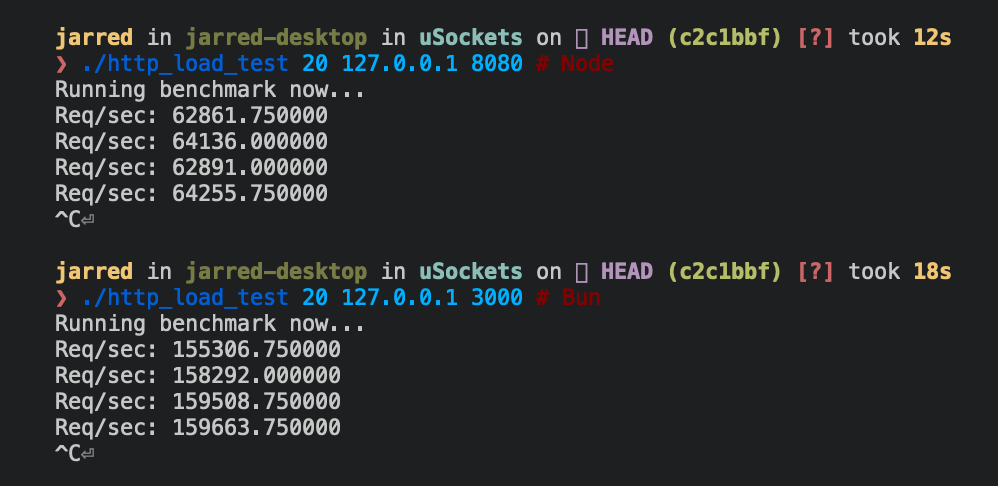
Below are Bun and Node.js implementations of a simple HTTP server that responds Bun! to each incoming Request.
{% codetabs %}
Bun.serve({
  fetch(req: Request) {
    return new Response(`Bun!`);
  },
  port: 3000,
});
require("http")
  .createServer((req, res) => res.end("Bun!"))
  .listen(8080);
{% /codetabs %}
The Bun.serve server can handle roughly 2.5x more requests per second than Node.js on Linux.
{% table %}
- Runtime
- Requests per second
- Node 16
- ~64,000
- Bun
- ~160,000
{% /table %}
{% image width="499" alt="image" src="https://user-images.githubusercontent.com/709451/162389032-fc302444-9d03-46be-ba87-c12bd8ce89a0.png" /%}
Reference
{% details summary="See TypeScript definitions" %}
interface Bun {
  serve(options: {
    fetch: (req: Request, server: Server) => Response | Promise<Response>;
    hostname?: string;
    port?: number;
    development?: boolean;
    error?: (error: Error) => Response | Promise<Response>;
    keyFile?: string;
    certFile?: string;
    caFile?: string;
    dhParamsFile?: string;
    passphrase?: string;
    maxRequestBodySize?: number;
    lowMemoryMode?: boolean;
  }): Server;
}

interface Server {
  development: boolean;
  hostname: string;
  port: number;
  pendingRequests: number;
  stop(): void;
}
{% /details %}