mirror of
https://github.com/oven-sh/bun
synced 2026-02-02 15:08:46 +00:00
 dce7a02f4d
This PR addresses several issues opened for the docs:

- Add callout for SQLite caching behavior between prepare() and query()
- Fix SQLite types and fix deprecated exec to run
- Fix Secrets API example
- Update SolidStart guide
- Add bun upgrade guide
- Prefer `process.versions.bun` over `typeof Bun` for detection
- Document complete `bunx` flags
- Improve Nitro preset documentation for Nuxt

Fixes #23165, #24424, #24294, #25175, #18433, #16804, #22967, #22527,
#10560, #14744
722 lines
24 KiB
Plaintext
722 lines
24 KiB
Plaintext
---
|
|
title: SQLite
|
|
description: Bun natively implements a high-performance SQLite3 driver.
|
|
---
|
|
|
|
Bun natively implements a high-performance [SQLite3](https://www.sqlite.org/) driver. To use it import from the built-in `bun:sqlite` module.
|
|
|
|
```ts db.ts icon="/icons/typescript.svg"
|
|
import { Database } from "bun:sqlite";
|
|
|
|
const db = new Database(":memory:");
|
|
const query = db.query("select 'Hello world' as message;");
|
|
query.get();
|
|
```
|
|
|
|
```txt
|
|
{ message: "Hello world" }
|
|
```
|
|
|
|
The API is simple, synchronous, and fast. Credit to [better-sqlite3](https://github.com/JoshuaWise/better-sqlite3) and its contributors for inspiring the API of `bun:sqlite`.
|
|
|
|
Features include:
|
|
|
|
- Transactions
|
|
- Parameters (named & positional)
|
|
- Prepared statements
|
|
- Datatype conversions (`BLOB` becomes `Uint8Array`)
|
|
- Map query results to classes without an ORM - `query.as(MyClass)`
|
|
- The fastest performance of any SQLite driver for JavaScript
|
|
- `bigint` support
|
|
- Multi-query statements (e.g. `SELECT 1; SELECT 2;`) in a single call to database.run(query)
|
|
|
|
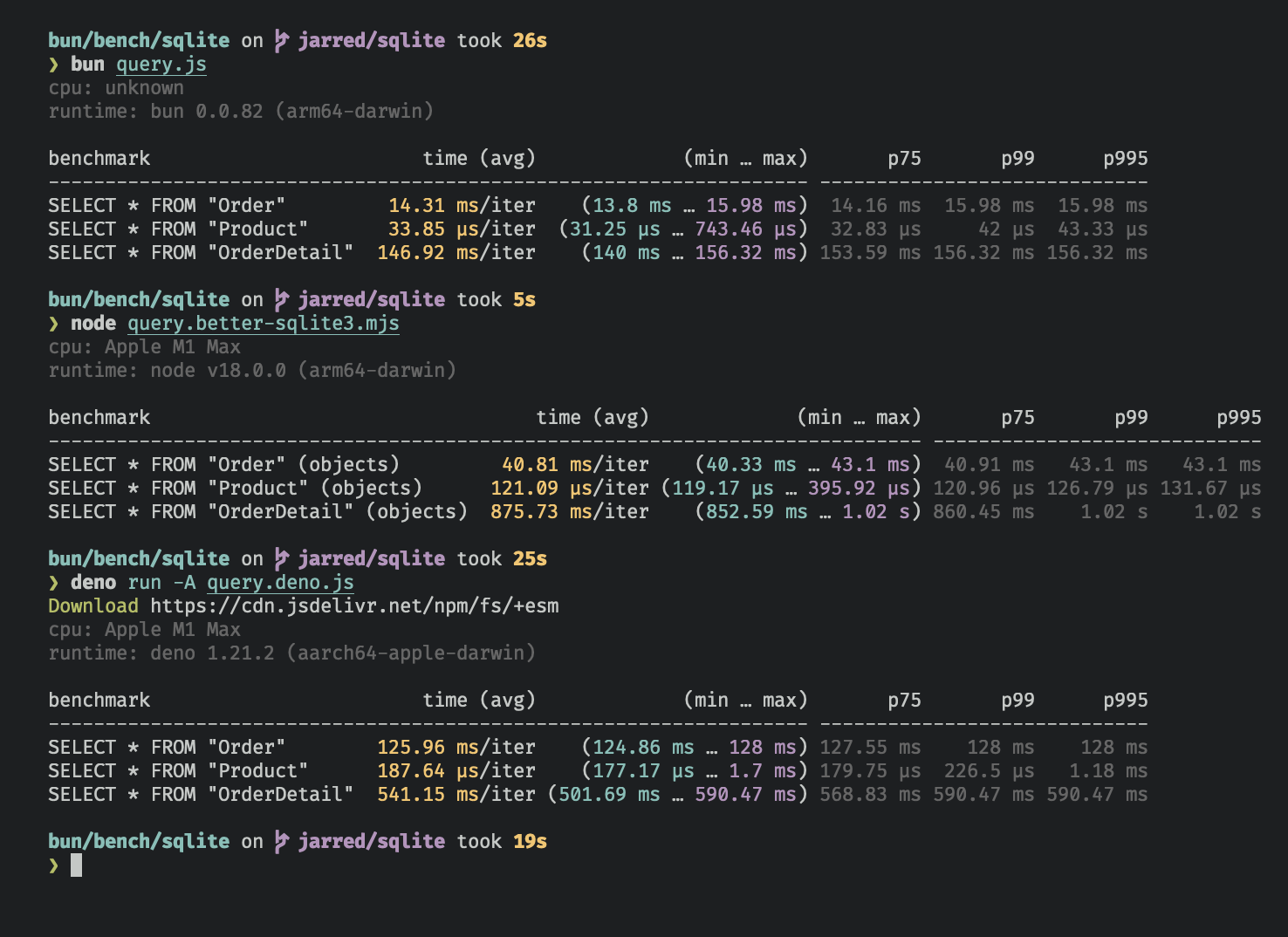
The `bun:sqlite` module is roughly 3-6x faster than `better-sqlite3` and 8-9x faster than `deno.land/x/sqlite` for read queries. Each driver was benchmarked against the [Northwind Traders](https://github.com/jpwhite3/northwind-SQLite3/blob/46d5f8a64f396f87cd374d1600dbf521523980e8/Northwind_large.sqlite.zip) dataset. View and run the [benchmark source](https://github.com/oven-sh/bun/tree/main/bench/sqlite).
|
|
|
|
<Frame caption="Benchmarked on an M1 MacBook Pro (64GB) running macOS 12.3.1">
|
|
|
|
</Frame>
|
|
|
|
---
|
|
|
|
## Database
|
|
|
|
To open or create a SQLite3 database:
|
|
|
|
```ts db.ts icon="/icons/typescript.svg"
|
|
import { Database } from "bun:sqlite";
|
|
|
|
const db = new Database("mydb.sqlite");
|
|
```
|
|
|
|
To open an in-memory database:
|
|
|
|
```ts db.ts icon="/icons/typescript.svg"
|
|
import { Database } from "bun:sqlite";
|
|
|
|
// all of these do the same thing
|
|
const db = new Database(":memory:");
|
|
const db = new Database();
|
|
const db = new Database("");
|
|
```
|
|
|
|
To open in `readonly` mode:
|
|
|
|
```ts db.ts icon="/icons/typescript.svg" highlight={2}
|
|
import { Database } from "bun:sqlite";
|
|
const db = new Database("mydb.sqlite", { readonly: true });
|
|
```
|
|
|
|
To create the database if the file doesn't exist:
|
|
|
|
```ts db.ts icon="/icons/typescript.svg" highlight={2}
|
|
import { Database } from "bun:sqlite";
|
|
const db = new Database("mydb.sqlite", { create: true });
|
|
```
|
|
|
|
### Strict mode
|
|
|
|
By default, `bun:sqlite` requires binding parameters to include the `$`, `:`, or `@` prefix, and does not throw an error if a parameter is missing.
|
|
|
|
To instead throw an error when a parameter is missing and allow binding without a prefix, set `strict: true` on the `Database` constructor:
|
|
|
|
```ts db.ts icon="/icons/typescript.svg" highlight={3}
|
|
import { Database } from "bun:sqlite";
|
|
|
|
const strict = new Database(":memory:", { strict: true });
|
|
|
|
// throws error because of the typo:
|
|
const query = strict.query("SELECT $message;").all({ messag: "Hello world" });
|
|
|
|
const notStrict = new Database(":memory:");
|
|
// does not throw error:
|
|
notStrict.query("SELECT $message;").all({ messag: "Hello world" });
|
|
```
|
|
|
|
### Load via ES module import
|
|
|
|
You can also use an import attribute to load a database.
|
|
|
|
```ts db.ts icon="/icons/typescript.svg" highlight={1}
|
|
import db from "./mydb.sqlite" with { type: "sqlite" };
|
|
|
|
console.log(db.query("select * from users LIMIT 1").get());
|
|
```
|
|
|
|
This is equivalent to the following:
|
|
|
|
```ts db.ts icon="/icons/typescript.svg"
|
|
import { Database } from "bun:sqlite";
|
|
const db = new Database("./mydb.sqlite");
|
|
```
|
|
|
|
### `.close(throwOnError: boolean = false)`
|
|
|
|
To close a database connection, but allow existing queries to finish, call `.close(false)`:
|
|
|
|
```ts db.ts icon="/icons/typescript.svg" highlight={3}
|
|
const db = new Database();
|
|
// ... do stuff
|
|
db.close(false);
|
|
```
|
|
|
|
To close the database and throw an error if there are any pending queries, call `.close(true)`:
|
|
|
|
```ts db.ts icon="/icons/typescript.svg" highlight={3}
|
|
const db = new Database();
|
|
// ... do stuff
|
|
db.close(true);
|
|
```
|
|
|
|
<Note>
|
|
`close(false)` is called automatically when the database is garbage collected. It is safe to call multiple times but
|
|
has no effect after the first.
|
|
</Note>
|
|
|
|
### `using` statement
|
|
|
|
You can use the `using` statement to ensure that a database connection is closed when the `using` block is exited.
|
|
|
|
```ts db.ts icon="/icons/typescript.svg" highlight={4, 5}
|
|
import { Database } from "bun:sqlite";
|
|
|
|
{
|
|
using db = new Database("mydb.sqlite");
|
|
using query = db.query("select 'Hello world' as message;");
|
|
console.log(query.get());
|
|
}
|
|
```
|
|
|
|
```txt
|
|
{ message: "Hello world" }
|
|
```
|
|
|
|
### `.serialize()`
|
|
|
|
`bun:sqlite` supports SQLite's built-in mechanism for [serializing](https://www.sqlite.org/c3ref/serialize.html) and [deserializing](https://www.sqlite.org/c3ref/deserialize.html) databases to and from memory.
|
|
|
|
```ts db.ts icon="/icons/typescript.svg" highlight={2}
|
|
const olddb = new Database("mydb.sqlite");
|
|
const contents = olddb.serialize(); // => Uint8Array
|
|
const newdb = Database.deserialize(contents);
|
|
```
|
|
|
|
Internally, `.serialize()` calls [`sqlite3_serialize`](https://www.sqlite.org/c3ref/serialize.html).
|
|
|
|
### `.query()`
|
|
|
|
Use the `db.query()` method on your `Database` instance to [prepare](https://www.sqlite.org/c3ref/prepare.html) a SQL query. The result is a `Statement` instance that will be cached on the `Database` instance. _The query will not be executed._
|
|
|
|
```ts db.ts icon="/icons/typescript.svg"
|
|
const query = db.query(`select "Hello world" as message`);
|
|
```
|
|
|
|
<Note>
|
|
**What does "cached" mean?**
|
|
|
|
The caching refers to the **compiled prepared statement** (the SQL bytecode), not the query results. When you call `db.query()` with the same SQL string multiple times, Bun returns the same cached `Statement` object instead of recompiling the SQL.
|
|
|
|
It is completely safe to reuse a cached statement with different parameter values:
|
|
|
|
```ts
|
|
const query = db.query("SELECT * FROM users WHERE id = ?");
|
|
query.get(1); // ✓ Works
|
|
query.get(2); // ✓ Also works - parameters are bound fresh each time
|
|
query.get(3); // ✓ Still works
|
|
```
|
|
|
|
Use `.prepare()` instead of `.query()` when you want a fresh `Statement` instance that isn't cached, for example if you're dynamically generating SQL and don't want to fill the cache with one-off queries.
|
|
|
|
```ts
|
|
// compile the prepared statement without caching
|
|
const query = db.prepare("SELECT * FROM foo WHERE bar = ?");
|
|
```
|
|
|
|
</Note>
|
|
|
|
---
|
|
|
|
## WAL mode
|
|
|
|
SQLite supports [write-ahead log mode](https://www.sqlite.org/wal.html) (WAL) which dramatically improves performance, especially in situations with many concurrent readers and a single writer. It's broadly recommended to enable WAL mode for most typical applications.
|
|
|
|
To enable WAL mode, run this pragma query at the beginning of your application:
|
|
|
|
```ts db.ts icon="/icons/typescript.svg"
|
|
db.run("PRAGMA journal_mode = WAL;");
|
|
```
|
|
|
|
<Accordion title="What is WAL mode?">
|
|
In WAL mode, writes to the database are written directly to a separate file called the "WAL file" (write-ahead log). This file will be later integrated into the main database file. Think of it as a buffer for pending writes. Refer to the [SQLite docs](https://www.sqlite.org/wal.html) for a more detailed overview.
|
|
|
|
On macOS, WAL files may be persistent by default. This is not a bug, it is how macOS configured the system version of SQLite.
|
|
|
|
</Accordion>
|
|
|
|
---
|
|
|
|
## Statements
|
|
|
|
A `Statement` is a _prepared query_, which means it's been parsed and compiled into an efficient binary form. It can be executed multiple times in a performant way.
|
|
|
|
Create a statement with the `.query` method on your `Database` instance.
|
|
|
|
```ts db.ts icon="/icons/typescript.svg"
|
|
const query = db.query(`select "Hello world" as message`);
|
|
```
|
|
|
|
Queries can contain parameters. These can be numerical (`?1`) or named (`$param` or `:param` or `@param`).
|
|
|
|
```ts db.ts icon="/icons/typescript.svg"
|
|
const query = db.query(`SELECT ?1, ?2;`);
|
|
const query = db.query(`SELECT $param1, $param2;`);
|
|
```
|
|
|
|
Values are bound to these parameters when the query is executed. A `Statement` can be executed with several different methods, each returning the results in a different form.
|
|
|
|
### Binding values
|
|
|
|
To bind values to a statement, pass an object to the `.all()`, `.get()`, `.run()`, or `.values()` method.
|
|
|
|
```ts db.ts icon="/icons/typescript.svg" highlight={2}
|
|
const query = db.query(`select $message;`);
|
|
query.all({ $message: "Hello world" });
|
|
```
|
|
|
|
You can bind using positional parameters too:
|
|
|
|
```ts db.ts icon="/icons/typescript.svg"
|
|
const query = db.query(`select ?1;`);
|
|
query.all("Hello world");
|
|
```
|
|
|
|
#### `strict: true` lets you bind values without prefixes
|
|
|
|
By default, the `$`, `:`, and `@` prefixes are **included** when binding values to named parameters. To bind without these prefixes, use the `strict` option in the `Database` constructor.
|
|
|
|
```ts db.ts icon="/icons/typescript.svg"
|
|
import { Database } from "bun:sqlite";
|
|
|
|
const db = new Database(":memory:", {
|
|
// bind values without prefixes
|
|
strict: true, // [!code ++]
|
|
});
|
|
|
|
const query = db.query(`select $message;`);
|
|
|
|
// strict: true
|
|
query.all({ message: "Hello world" });
|
|
|
|
// strict: false
|
|
// query.all({ $message: "Hello world" });
|
|
```
|
|
|
|
### `.all()`
|
|
|
|
Use `.all()` to run a query and get back the results as an array of objects.
|
|
|
|
```ts db.ts icon="/icons/typescript.svg" highlight={2}
|
|
const query = db.query(`select $message;`);
|
|
query.all({ $message: "Hello world" });
|
|
```
|
|
|
|
```txt
|
|
[{ message: "Hello world" }]
|
|
```
|
|
|
|
Internally, this calls [`sqlite3_reset`](https://www.sqlite.org/capi3ref.html#sqlite3_reset) and repeatedly calls [`sqlite3_step`](https://www.sqlite.org/capi3ref.html#sqlite3_step) until it returns `SQLITE_DONE`.
|
|
|
|
### `.get()`
|
|
|
|
Use `.get()` to run a query and get back the first result as an object.
|
|
|
|
```ts db.ts icon="/icons/typescript.svg" highlight={2}
|
|
const query = db.query(`select $message;`);
|
|
query.get({ $message: "Hello world" });
|
|
```
|
|
|
|
```txt
|
|
{ $message: "Hello world" }
|
|
```
|
|
|
|
Internally, this calls [`sqlite3_reset`](https://www.sqlite.org/capi3ref.html#sqlite3_reset) followed by [`sqlite3_step`](https://www.sqlite.org/capi3ref.html#sqlite3_step) until it no longer returns `SQLITE_ROW`. If the query returns no rows, `undefined` is returned.
|
|
|
|
### `.run()`
|
|
|
|
Use `.run()` to run a query and get back `undefined`. This is useful for schema-modifying queries (e.g. `CREATE TABLE`) or bulk write operations.
|
|
|
|
```ts db.ts icon="/icons/typescript.svg" highlight={2}
|
|
const query = db.query(`create table foo;`);
|
|
query.run();
|
|
```
|
|
|
|
```txt
|
|
{
|
|
lastInsertRowid: 0,
|
|
changes: 0,
|
|
}
|
|
```
|
|
|
|
Internally, this calls [`sqlite3_reset`](https://www.sqlite.org/capi3ref.html#sqlite3_reset) and calls [`sqlite3_step`](https://www.sqlite.org/capi3ref.html#sqlite3_step) once. Stepping through all the rows is not necessary when you don't care about the results.
|
|
|
|
The `lastInsertRowid` property returns the ID of the last row inserted into the database. The `changes` property is the number of rows affected by the query.
|
|
|
|
### `.as(Class)` - Map query results to a class
|
|
|
|
Use `.as(Class)` to run a query and get back the results as instances of a class. This lets you attach methods & getters/setters to results.
|
|
|
|
```ts db.ts icon="/icons/typescript.svg" highlight={10}
|
|
class Movie {
|
|
title: string;
|
|
year: number;
|
|
|
|
get isMarvel() {
|
|
return this.title.includes("Marvel");
|
|
}
|
|
}
|
|
|
|
const query = db.query("SELECT title, year FROM movies").as(Movie);
|
|
const movies = query.all();
|
|
const first = query.get();
|
|
|
|
console.log(movies[0].isMarvel);
|
|
console.log(first.isMarvel);
|
|
```
|
|
|
|
```txt
|
|
true
|
|
true
|
|
```
|
|
|
|
As a performance optimization, the class constructor is not called, default initializers are not run, and private fields are not accessible. This is more like using `Object.create` than `new`. The class's prototype is assigned to the object, methods are attached, and getters/setters are set up, but the constructor is not called.
|
|
|
|
The database columns are set as properties on the class instance.
|
|
|
|
### `.iterate()` (`@@iterator`)
|
|
|
|
Use `.iterate()` to run a query and incrementally return results. This is useful for large result sets that you want to process one row at a time without loading all the results into memory.
|
|
|
|
```ts db.ts icon="/icons/typescript.svg" highlight={2}
|
|
const query = db.query("SELECT * FROM foo");
|
|
for (const row of query.iterate()) {
|
|
console.log(row);
|
|
}
|
|
```
|
|
|
|
You can also use the `@@iterator` protocol:
|
|
|
|
```ts db.ts icon="/icons/typescript.svg" highlight={2}
|
|
const query = db.query("SELECT * FROM foo");
|
|
for (const row of query) {
|
|
console.log(row);
|
|
}
|
|
```
|
|
|
|
### `.values()`
|
|
|
|
Use `values()` to run a query and get back all results as an array of arrays.
|
|
|
|
```ts db.ts icon="/icons/typescript.svg" highlight={3, 4}
|
|
const query = db.query(`select $message;`);
|
|
|
|
query.values({ $message: "Hello world" });
|
|
query.values(2);
|
|
```
|
|
|
|
```txt
|
|
[
|
|
[ "Iron Man", 2008 ],
|
|
[ "The Avengers", 2012 ],
|
|
[ "Ant-Man: Quantumania", 2023 ],
|
|
]
|
|
```
|
|
|
|
Internally, this calls [`sqlite3_reset`](https://www.sqlite.org/capi3ref.html#sqlite3_reset) and repeatedly calls [`sqlite3_step`](https://www.sqlite.org/capi3ref.html#sqlite3_step) until it returns `SQLITE_DONE`.
|
|
|
|
### `.finalize()`
|
|
|
|
Use `.finalize()` to destroy a `Statement` and free any resources associated with it. Once finalized, a `Statement` cannot be executed again. Typically, the garbage collector will do this for you, but explicit finalization may be useful in performance-sensitive applications.
|
|
|
|
```ts db.ts icon="/icons/typescript.svg" highlight={3}
|
|
const query = db.query("SELECT title, year FROM movies");
|
|
const movies = query.all();
|
|
query.finalize();
|
|
```
|
|
|
|
### `.toString()`
|
|
|
|
Calling `toString()` on a `Statement` instance prints the expanded SQL query. This is useful for debugging.
|
|
|
|
```ts db.ts icon="/icons/typescript.svg" highlight={6, 9, 12}
|
|
import { Database } from "bun:sqlite";
|
|
|
|
// setup
|
|
const query = db.query("SELECT $param;");
|
|
|
|
console.log(query.toString()); // => "SELECT NULL"
|
|
|
|
query.run(42);
|
|
console.log(query.toString()); // => "SELECT 42"
|
|
|
|
query.run(365);
|
|
console.log(query.toString()); // => "SELECT 365"
|
|
```
|
|
|
|
Internally, this calls [`sqlite3_expanded_sql`](https://www.sqlite.org/capi3ref.html#sqlite3_expanded_sql). The parameters are expanded using the most recently bound values.
|
|
|
|
## Parameters
|
|
|
|
Queries can contain parameters. These can be numerical (`?1`) or named (`$param` or `:param` or `@param`). Bind values to these parameters when executing the query:
|
|
|
|
```ts title="query.ts" icon="/icons/typescript.svg"
|
|
const query = db.query("SELECT * FROM foo WHERE bar = $bar");
|
|
const results = query.all({
|
|
$bar: "bar",
|
|
});
|
|
```
|
|
|
|
```txt
|
|
[{ "$bar": "bar" }]
|
|
```
|
|
|
|
Numbered (positional) parameters work too:
|
|
|
|
```ts db.ts icon="/icons/typescript.svg"
|
|
const query = db.query("SELECT ?1, ?2");
|
|
const results = query.all("hello", "goodbye");
|
|
```
|
|
|
|
```txt
|
|
[
|
|
{
|
|
"?1": "hello",
|
|
"?2": "goodbye",
|
|
},
|
|
];
|
|
```
|
|
|
|
---
|
|
|
|
## Integers
|
|
|
|
sqlite supports signed 64 bit integers, but JavaScript only supports signed 52 bit integers or arbitrary precision integers with `bigint`.
|
|
|
|
`bigint` input is supported everywhere, but by default `bun:sqlite` returns integers as `number` types. If you need to handle integers larger than 2^53, set `safeIntegers` option to `true` when creating a `Database` instance. This also validates that `bigint` passed to `bun:sqlite` do not exceed 64 bits.
|
|
|
|
By default, `bun:sqlite` returns integers as `number` types. If you need to handle integers larger than 2^53, you can use the `bigint` type.
|
|
|
|
### `safeIntegers: true`
|
|
|
|
When `safeIntegers` is `true`, `bun:sqlite` will return integers as `bigint` types:
|
|
|
|
```ts db.ts icon="/icons/typescript.svg" highlight={3}
|
|
import { Database } from "bun:sqlite";
|
|
|
|
const db = new Database(":memory:", { safeIntegers: true });
|
|
const query = db.query(`SELECT ${BigInt(Number.MAX_SAFE_INTEGER) + 102n} as max_int`);
|
|
const result = query.get();
|
|
|
|
console.log(result.max_int);
|
|
```
|
|
|
|
```txt
|
|
9007199254741093n
|
|
```
|
|
|
|
When `safeIntegers` is `true`, `bun:sqlite` will throw an error if a `bigint` value in a bound parameter exceeds 64 bits:
|
|
|
|
```ts db.ts icon="/icons/typescript.svg" highlight={3}
|
|
import { Database } from "bun:sqlite";
|
|
|
|
const db = new Database(":memory:", { safeIntegers: true });
|
|
db.run("CREATE TABLE test (id INTEGER PRIMARY KEY, value INTEGER)");
|
|
|
|
const query = db.query("INSERT INTO test (value) VALUES ($value)");
|
|
|
|
try {
|
|
query.run({ $value: BigInt(Number.MAX_SAFE_INTEGER) ** 2n });
|
|
} catch (e) {
|
|
console.log(e.message);
|
|
}
|
|
```
|
|
|
|
```txt
|
|
BigInt value '81129638414606663681390495662081' is out of range
|
|
```
|
|
|
|
### `safeIntegers: false` (default)
|
|
|
|
When `safeIntegers` is `false`, `bun:sqlite` will return integers as `number` types and truncate any bits beyond 53:
|
|
|
|
```ts db.ts icon="/icons/typescript.svg" highlight={3}
|
|
import { Database } from "bun:sqlite";
|
|
|
|
const db = new Database(":memory:", { safeIntegers: false });
|
|
const query = db.query(`SELECT ${BigInt(Number.MAX_SAFE_INTEGER) + 102n} as max_int`);
|
|
const result = query.get();
|
|
console.log(result.max_int);
|
|
```
|
|
|
|
```txt
|
|
9007199254741092
|
|
```
|
|
|
|
---
|
|
|
|
## Transactions
|
|
|
|
Transactions are a mechanism for executing multiple queries in an _atomic_ way; that is, either all of the queries succeed or none of them do. Create a transaction with the `db.transaction()` method:
|
|
|
|
```ts db.ts icon="/icons/typescript.svg" highlight={2}
|
|
const insertCat = db.prepare("INSERT INTO cats (name) VALUES ($name)");
|
|
const insertCats = db.transaction(cats => {
|
|
for (const cat of cats) insertCat.run(cat);
|
|
});
|
|
```
|
|
|
|
At this stage, we haven't inserted any cats! The call to `db.transaction()` returns a new function (`insertCats`) that _wraps_ the function that executes the queries.
|
|
|
|
To execute the transaction, call this function. All arguments will be passed through to the wrapped function; the return value of the wrapped function will be returned by the transaction function. The wrapped function also has access to the `this` context as defined where the transaction is executed.
|
|
|
|
```ts db.ts icon="/icons/typescript.svg" highlight={3}
|
|
const insert = db.prepare("INSERT INTO cats (name) VALUES ($name)");
|
|
const insertCats = db.transaction(cats => {
|
|
for (const cat of cats) insert.run(cat);
|
|
return cats.length;
|
|
});
|
|
|
|
const count = insertCats([{ $name: "Keanu" }, { $name: "Salem" }, { $name: "Crookshanks" }]);
|
|
|
|
console.log(`Inserted ${count} cats`);
|
|
```
|
|
|
|
The driver will automatically [`begin`](https://www.sqlite.org/lang_transaction.html) a transaction when `insertCats` is called and `commit` it when the wrapped function returns. If an exception is thrown, the transaction will be rolled back. The exception will propagate as usual; it is not caught.
|
|
|
|
<Note>
|
|
**Nested transactions** — Transaction functions can be called from inside other transaction functions. When doing so, the inner transaction becomes a [savepoint](https://www.sqlite.org/lang_savepoint.html).
|
|
|
|
<Accordion title="View nested transaction example">
|
|
|
|
```ts db.ts icon="/icons/typescript.svg"
|
|
// setup
|
|
import { Database } from "bun:sqlite";
|
|
const db = Database.open(":memory:");
|
|
db.run("CREATE TABLE expenses (id INTEGER PRIMARY KEY AUTOINCREMENT, note TEXT, dollars INTEGER);");
|
|
db.run("CREATE TABLE cats (id INTEGER PRIMARY KEY AUTOINCREMENT, name TEXT UNIQUE, age INTEGER)");
|
|
const insertExpense = db.prepare("INSERT INTO expenses (note, dollars) VALUES (?, ?)");
|
|
const insert = db.prepare("INSERT INTO cats (name, age) VALUES ($name, $age)");
|
|
const insertCats = db.transaction(cats => {
|
|
for (const cat of cats) insert.run(cat);
|
|
});
|
|
|
|
const adopt = db.transaction(cats => {
|
|
insertExpense.run("adoption fees", 20);
|
|
insertCats(cats); // nested transaction
|
|
});
|
|
|
|
adopt([
|
|
{ $name: "Joey", $age: 2 },
|
|
{ $name: "Sally", $age: 4 },
|
|
{ $name: "Junior", $age: 1 },
|
|
]);
|
|
```
|
|
|
|
</Accordion>
|
|
</Note>
|
|
|
|
Transactions also come with `deferred`, `immediate`, and `exclusive` versions.
|
|
|
|
```ts
|
|
insertCats(cats); // uses "BEGIN"
|
|
insertCats.deferred(cats); // uses "BEGIN DEFERRED"
|
|
insertCats.immediate(cats); // uses "BEGIN IMMEDIATE"
|
|
insertCats.exclusive(cats); // uses "BEGIN EXCLUSIVE"
|
|
```
|
|
|
|
### `.loadExtension()`
|
|
|
|
To load a [SQLite extension](https://www.sqlite.org/loadext.html), call `.loadExtension(name)` on your `Database` instance
|
|
|
|
```ts db.ts icon="/icons/typescript.svg" highlight={4}
|
|
import { Database } from "bun:sqlite";
|
|
|
|
const db = new Database();
|
|
db.loadExtension("myext");
|
|
```
|
|
|
|
<Note>
|
|
**MacOS users** By default, macOS ships with Apple's proprietary build of SQLite, which doesn't support extensions. To use extensions, you'll need to install a vanilla build of SQLite.
|
|
|
|
```bash terminal icon="terminal"
|
|
brew install sqlite
|
|
which sqlite # get path to binary
|
|
```
|
|
|
|
To point `bun:sqlite` to the new build, call `Database.setCustomSQLite(path)` before creating any `Database` instances. (On other operating systems, this is a no-op.) Pass a path to the SQLite `.dylib` file, _not_ the executable. With recent versions of Homebrew this is something like `/opt/homebrew/Cellar/sqlite/<version>/libsqlite3.dylib`.
|
|
|
|
```ts db.ts icon="/icons/typescript.svg" highlight={3}
|
|
import { Database } from "bun:sqlite";
|
|
|
|
Database.setCustomSQLite("/path/to/libsqlite.dylib");
|
|
|
|
const db = new Database();
|
|
db.loadExtension("myext");
|
|
```
|
|
|
|
</Note>
|
|
|
|
### `.fileControl(cmd: number, value: any)`
|
|
|
|
To use the advanced `sqlite3_file_control` API, call `.fileControl(cmd, value)` on your `Database` instance.
|
|
|
|
```ts db.ts icon="/icons/typescript.svg" highlight={6}
|
|
import { Database, constants } from "bun:sqlite";
|
|
|
|
const db = new Database();
|
|
// Ensure WAL mode is NOT persistent
|
|
// this prevents wal files from lingering after the database is closed
|
|
db.fileControl(constants.SQLITE_FCNTL_PERSIST_WAL, 0);
|
|
```
|
|
|
|
`value` can be:
|
|
|
|
- `number`
|
|
- `TypedArray`
|
|
- `undefined` or `null`
|
|
|
|
---
|
|
|
|
## Reference
|
|
|
|
```ts Type Reference icon="/icons/typescript.svg" expandable
|
|
class Database {
|
|
constructor(
|
|
filename: string,
|
|
options?:
|
|
| number
|
|
| {
|
|
readonly?: boolean;
|
|
create?: boolean;
|
|
readwrite?: boolean;
|
|
safeIntegers?: boolean;
|
|
strict?: boolean;
|
|
},
|
|
);
|
|
|
|
query<ReturnType, ParamsType>(sql: string): Statement<ReturnType, ParamsType>;
|
|
prepare<ReturnType, ParamsType>(sql: string): Statement<ReturnType, ParamsType>;
|
|
run(sql: string, params?: SQLQueryBindings): { lastInsertRowid: number; changes: number };
|
|
exec = this.run;
|
|
|
|
transaction(insideTransaction: (...args: any) => void): CallableFunction & {
|
|
deferred: (...args: any) => void;
|
|
immediate: (...args: any) => void;
|
|
exclusive: (...args: any) => void;
|
|
};
|
|
|
|
close(throwOnError?: boolean): void;
|
|
}
|
|
|
|
class Statement<ReturnType, ParamsType> {
|
|
all(...params: ParamsType[]): ReturnType[];
|
|
get(...params: ParamsType[]): ReturnType | null;
|
|
run(...params: ParamsType[]): {
|
|
lastInsertRowid: number;
|
|
changes: number;
|
|
};
|
|
values(...params: ParamsType[]): unknown[][];
|
|
|
|
finalize(): void; // destroy statement and clean up resources
|
|
toString(): string; // serialize to SQL
|
|
|
|
columnNames: string[]; // the column names of the result set
|
|
columnTypes: string[]; // types based on actual values in first row (call .get()/.all() first)
|
|
declaredTypes: (string | null)[]; // types from CREATE TABLE schema (call .get()/.all() first)
|
|
paramsCount: number; // the number of parameters expected by the statement
|
|
native: any; // the native object representing the statement
|
|
|
|
as<T>(Class: new (...args: any[]) => T): Statement<T, ParamsType>;
|
|
}
|
|
|
|
type SQLQueryBindings =
|
|
| string
|
|
| bigint
|
|
| TypedArray
|
|
| number
|
|
| boolean
|
|
| null
|
|
| Record<string, string | bigint | TypedArray | number | boolean | null>;
|
|
```
|
|
|
|
### Datatypes
|
|
|
|
| JavaScript type | SQLite type |
|
|
| --------------- | ---------------------- |
|
|
| `string` | `TEXT` |
|
|
| `number` | `INTEGER` or `DECIMAL` |
|
|
| `boolean` | `INTEGER` (1 or 0) |
|
|
| `Uint8Array` | `BLOB` |
|
|
| `Buffer` | `BLOB` |
|
|
| `bigint` | `INTEGER` |
|
|
| `null` | `NULL` |
|