
2.0 KiB
Troubleshooting
Bun not running on an M1 (or Apple Silicon)
If you see a message like this
[1] 28447 killed bun create next ./test
It most likely means you’re running Bun’s x64 version on Apple Silicon. This happens if Bun is running via Rosetta. Rosetta is unable to emulate AVX2 instructions, which Bun indirectly uses.
The fix is to ensure you installed a version of Bun built for Apple Silicon.
error: Unexpected
If you see an error like this:
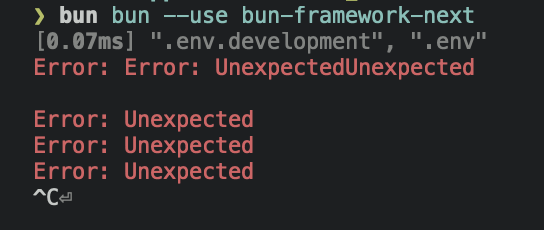
It usually means the max number of open file descriptors is being explicitly set to a low number. By default, Bun requests the max number of file descriptors available (which on macOS, is something like 32,000). But, if you previously ran into ulimit issues with, e.g., Chokidar, someone on The Internet may have advised you to run ulimit -n 8096.
That advice unfortunately lowers the hard limit to 8096. This can be a problem in large repositories or projects with lots of dependencies. Chokidar (and other watchers) don’t seem to call setrlimit, which means they’re reliant on the (much lower) soft limit.
To fix this issue:
- Remove any scripts that call
ulimit -nand restart your shell. - Try again, and if the error still occurs, try setting
ulimit -nto an absurdly high number, such asulimit -n 2147483646 - Try again, and if that still doesn’t fix it, open an issue
Unzip is required
Unzip is required to install Bun on Linux. You can use one of the following commands to install unzip:
Debian / Ubuntu / Mint
$ sudo apt install unzip
RedHat / CentOS / Fedora
$ sudo dnf install unzip
Arch / Manjaro
$ sudo pacman -S unzip
OpenSUSE
$ sudo zypper install unzip
bun install is stuck
Please run bun install --verbose 2> logs.txt and send them to me in Bun's discord. If you're on Linux, it would also be helpful if you run sudo perf trace bun install --silent and attach the logs.