mirror of
https://github.com/oven-sh/bun
synced 2026-02-10 10:58:56 +00:00
 db2f768bd9
### What does this PR do?

fix #23001 by removing references to old codelens from before the native
integration which should have its own (better and) native way of
starting

### How did you verify your code works?
134 lines
4.8 KiB
Markdown
134 lines
4.8 KiB
Markdown
# Bun for Visual Studio Code
|
|
|
|

|
|
|
|
<img align="right" src="https://user-images.githubusercontent.com/709451/182802334-d9c42afe-f35d-4a7b-86ea-9985f73f20c3.png" height="150px" style="float: right; padding: 30px;">
|
|
|
|
This extension adds support for using [Bun](https://bun.com/) with Visual Studio Code. Bun is an all-in-one toolkit for JavaScript and TypeScript apps.
|
|
|
|
At its core is the _Bun runtime_, a fast JavaScript runtime designed as a drop-in replacement for Node.js. It's written in Zig and powered by JavaScriptCore under the hood, dramatically reducing startup times and memory usage.
|
|
|
|
<div align="center">
|
|
<a href="https://bun.com/docs">Documentation</a>
|
|
<span> • </span>
|
|
<a href="https://discord.com/invite/CXdq2DP29u">Discord</a>
|
|
<span> • </span>
|
|
<a href="https://github.com/oven-sh/bun/issues/new">Issues</a>
|
|
<span> • </span>
|
|
<a href="https://github.com/oven-sh/bun/issues/159">Roadmap</a>
|
|
<br/>
|
|
</div>
|
|
|
|
## Features:
|
|
|
|
- Live in-editor error messages (gif below)
|
|
- Vscode test runner support
|
|
- Debugger support
|
|
- Run scripts from package.json
|
|
- Visual lockfile viewer for old binary lockfiles (`bun.lockb`)
|
|
|
|
## Bun test runner integration
|
|
|
|
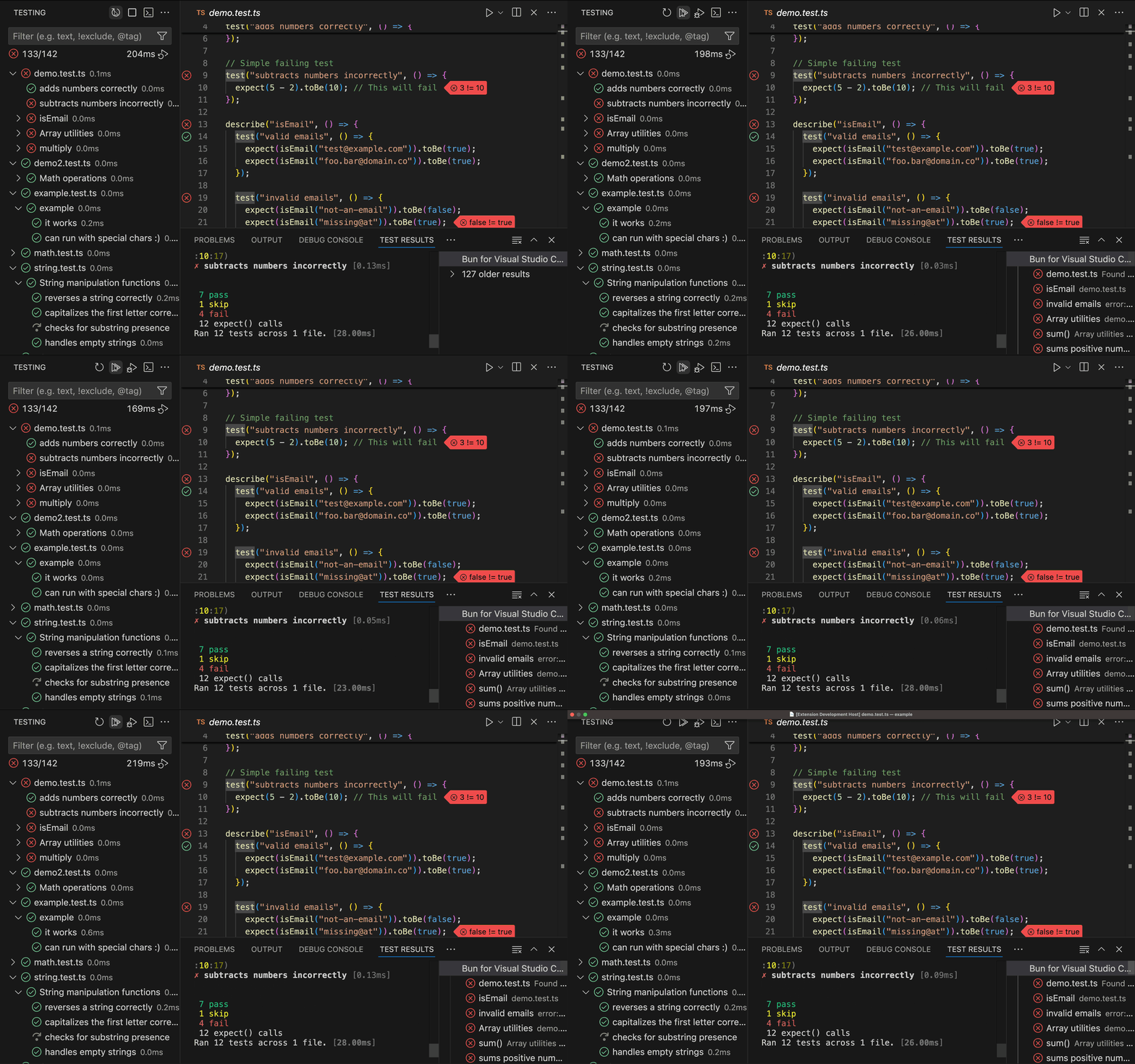
Run and debug tests directly from VSCode's Testing panel. The extension automatically discovers test files, shows inline test status, and provides rich error messages with diffs.
|
|
|
|
|
|
|
|
## In-editor error messages
|
|
|
|
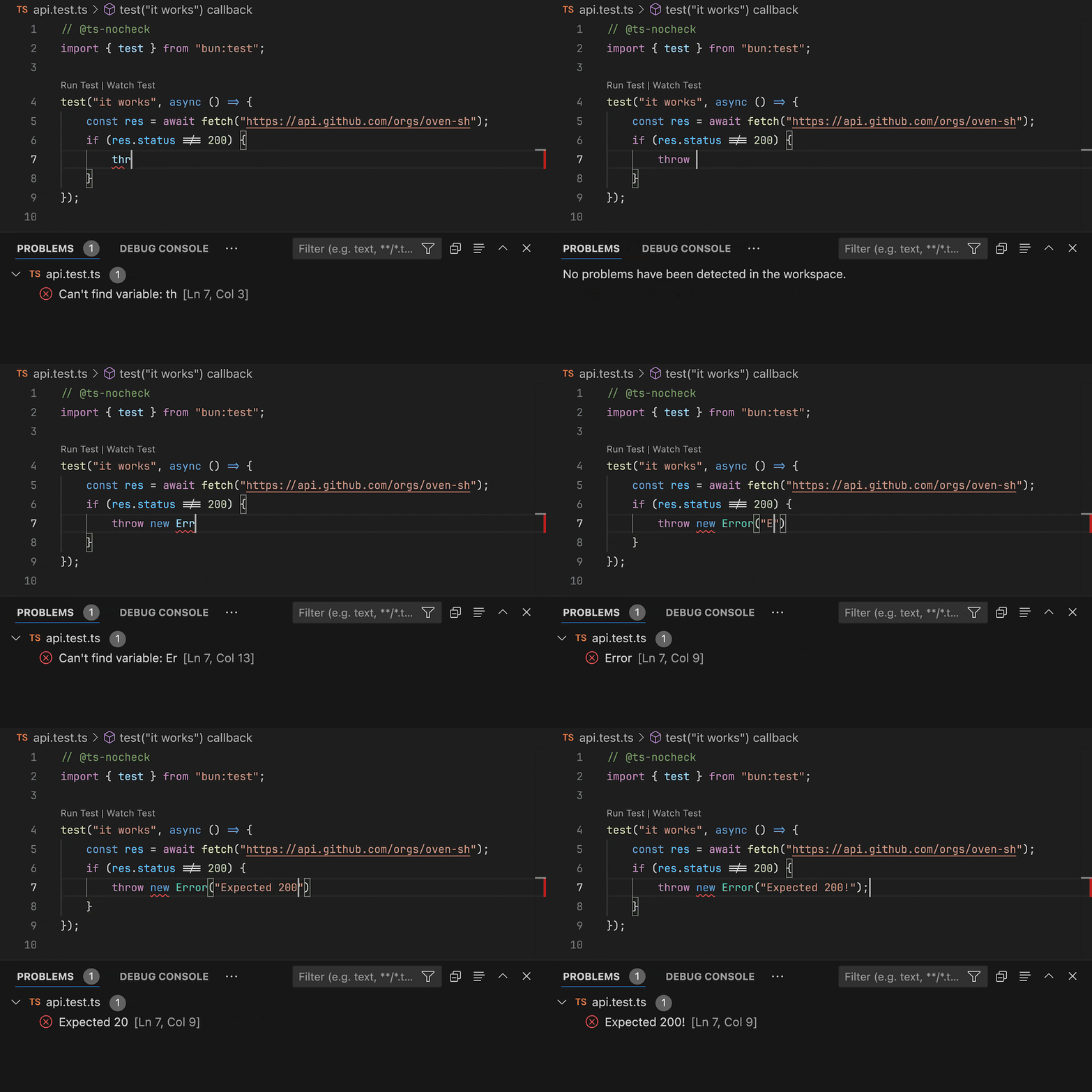
When running programs with Bun from a Visual Studio Code terminal, Bun will connect to the extension and report errors as they happen, at the exact location they happened. We recommend using this feature with `bun --watch` so you can see errors on every save.
|
|
|
|
|
|
|
|
<div align="center">
|
|
<sup>In the example above VSCode is saving on every keypress. Under normal configuration you'd only see errors on every save.</sup>
|
|
</div>
|
|
|
|
Errors are cleared whenever you start typing, or whenever the extension detects that Bun just started running (or reloading) a new program.
|
|
|
|
## Configuration
|
|
|
|
### `.vscode/launch.json`
|
|
|
|
You can use the following configurations to debug JavaScript and TypeScript files using Bun.
|
|
|
|
```jsonc
|
|
{
|
|
"version": "0.2.0",
|
|
"configurations": [
|
|
{
|
|
"type": "bun",
|
|
"request": "launch",
|
|
"name": "Debug Bun",
|
|
|
|
// The path to a JavaScript or TypeScript file to run.
|
|
"program": "${file}",
|
|
|
|
// The arguments to pass to the program, if any.
|
|
"args": [],
|
|
|
|
// The working directory of the program.
|
|
"cwd": "${workspaceFolder}",
|
|
|
|
// The environment variables to pass to the program.
|
|
"env": {},
|
|
|
|
// If the environment variables should not be inherited from the parent process.
|
|
"strictEnv": false,
|
|
|
|
// If the program should be run in watch mode.
|
|
// This is equivalent to passing `--watch` to the `bun` executable.
|
|
// You can also set this to "hot" to enable hot reloading using `--hot`.
|
|
"watchMode": false,
|
|
|
|
// If the debugger should stop on the first line of the program.
|
|
"stopOnEntry": false,
|
|
|
|
// If the debugger should be disabled. (for example, breakpoints will not be hit)
|
|
"noDebug": false,
|
|
|
|
// The path to the `bun` executable, defaults to your `PATH` environment variable.
|
|
"runtime": "bun",
|
|
|
|
// The arguments to pass to the `bun` executable, if any.
|
|
// Unlike `args`, these are passed to the executable itself, not the program.
|
|
"runtimeArgs": [],
|
|
},
|
|
{
|
|
"type": "bun",
|
|
"request": "attach",
|
|
"name": "Attach to Bun",
|
|
|
|
// The URL of the WebSocket inspector to attach to.
|
|
// This value can be retrieved by using `bun --inspect`.
|
|
"url": "ws://localhost:6499/",
|
|
// Optional path mapping for remote debugging
|
|
"localRoot": "${workspaceFolder}",
|
|
"remoteRoot": "/app",
|
|
},
|
|
],
|
|
}
|
|
```
|
|
|
|
### `.vscode/settings.json`
|
|
|
|
You can use the following configurations to customize the behavior of the Bun extension.
|
|
|
|
```jsonc
|
|
{
|
|
// The path to the `bun` executable.
|
|
"bun.runtime": "/path/to/bun",
|
|
|
|
// If support for Bun should be added to the default "JavaScript Debug Terminal".
|
|
"bun.debugTerminal.enabled": true,
|
|
|
|
// If the debugger should stop on the first line of the program.
|
|
"bun.debugTerminal.stopOnEntry": false,
|
|
|
|
// Glob pattern to find test files. Defaults to the value shown below.
|
|
"bun.test.filePattern": "**/*{.test.,.spec.,_test_,_spec_}{js,ts,tsx,jsx,mts,cts,cjs,mjs}",
|
|
|
|
// The custom script to call for testing instead of `bun test`
|
|
"bun.test.customScript": "bun test",
|
|
}
|
|
```
|